BookmarkSubscribeRSS Feed
jerry898969
Pyrite | Level 9

I'm doing the following proc export on a SAS 9.3 64-bit TS1M0 server version.  I'm using the pc file server.  I was unable to create an xlsx file so I read that it has to be an xlsb file.  But when it generates it always goes to the last row of data but you can't see that row.  I have to scroll up to see any data at all.  Is there an option to correct this? proc export data = test             outfile="d\test.xlsb" replace dbms=excelcs ; run; Thank you

1 REPLY 1
Cynthia_sas
Diamond | Level 26

Hi:

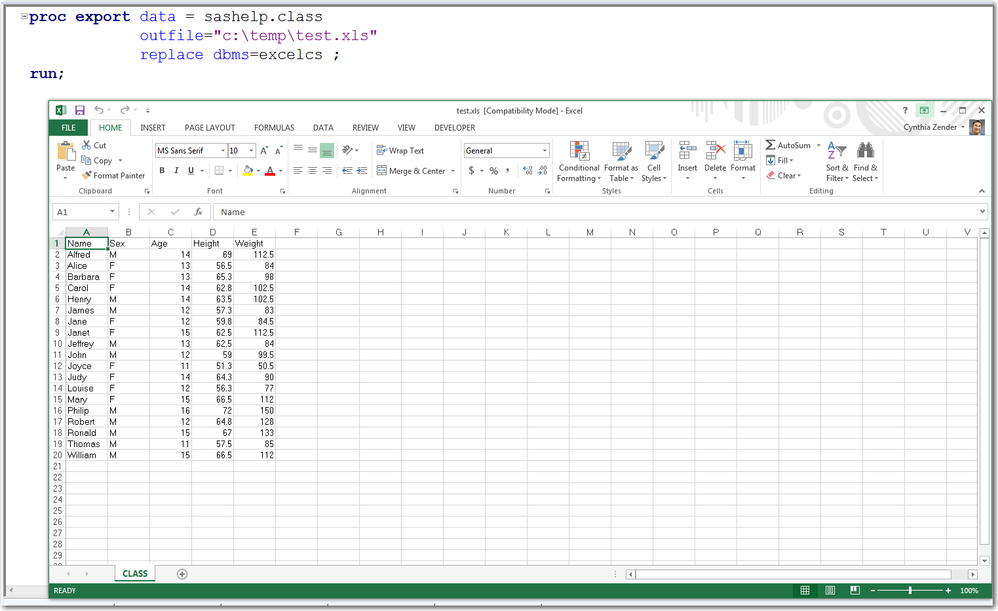
  I don't understand why it "has to be an xlsb file" -- when I run the code in the screen shot to make an XLS file, using SAS 9.4, I get an XLS file. I don't "have" to make it XLSB. But if you find that there are problems making an XLSB file, you might want to work with Tech Support. For example, this Tech Support note 40597 - The SAS® PC Files Server engine ignores the FILENAME statement even though the SAS® log indi... shows the creation of .XLSB files in the sample code, but it doesn't say that XLSB is the ONLY file type that you "have to" create.
   

cynthia


proc_export_excelcs.png

Catch up on SAS Innovate 2026

Nearly 200 sessions are now available on demand in the Innovate Hub.

Watch Now →
What is Bayesian Analysis?

Learn the difference between classical and Bayesian statistical approaches and see a few PROC examples to perform Bayesian analysis in this video.

Find more tutorials on the SAS Users YouTube channel.

SAS Training: Just a Click Away

 Ready to level-up your skills? Choose your own adventure.

Browse our catalog!

Discussion stats
  • 1 reply
  • 2955 views
  • 0 likes
  • 2 in conversation