- Home
- /
- Programming
- /
- Enterprise Guide
- /
- Using EG 4.2 - how to extract 1st 3 digits from numeric column?
- RSS Feed
- Mark Topic as New
- Mark Topic as Read
- Float this Topic for Current User
- Bookmark
- Subscribe
- Mute
- Printer Friendly Page


- Mark as New
- Bookmark
- Subscribe
- Mute
- RSS Feed
- Permalink
- Report Inappropriate Content
I have a numeric column "ACCTID" defined as length 16, example value 3508777719876543. I want to extract the 1st 3 digits from the value and create a new column with it's contents. I have created a computed column named "ACCTID_3" using the following advanced expression:
(SUBSTR(PUT(t1.ACCTID, BEST.),1,3)) and my result is 3.5 (the result I want is 350) ((I don't care if the result is numeric or character)
In the advanced edit window, on page 2 of 3 titled "Modify Additional Options", the column type is defined as numeric, with 'none' for the format.
I have changed this to column type 'character' and it does not like it. Can you please tell me what I am doing wrong? Any help would be greatly appreciated!!
Accepted Solutions


- Mark as New
- Bookmark
- Subscribe
- Mute
- RSS Feed
- Permalink
- Report Inappropriate Content
Sorry ... I meant force it for the output on the screen where it asked if you want Character or Numeric.
Select Character and set the format to $8. Setting the format should be enough.
You don't have to set the length -leave it blank.
Change your original calculation back to this:SUBSTR(PUT(t1.ACCOUNT_ID, 8.),1,3)
- Mark as New
- Bookmark
- Subscribe
- Mute
- RSS Feed
- Permalink
- Report Inappropriate Content
Try this instead:
(SUBSTR(PUT(t1.ACCTID, 8.),1,3))
and set the format to $8. or make it a character. A character value will not insert the decimal point.
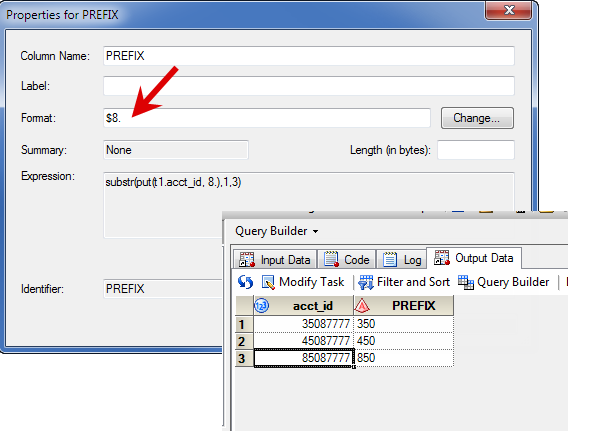
Tricia
- Mark as New
- Bookmark
- Subscribe
- Mute
- RSS Feed
- Permalink
- Report Inappropriate Content
I am using SAS EG 4.2, our screens are a bit different so we must not be on the same release. I am still getting the decimal. No matter what I change the column format to, it makes it numeric.
On the 2nd screen "Modify additional properties", I give the column & alias name and under 'column type' there are radio buttons for either Character or Numeric. I am chosing 'character'. On the 3rd screen, it still interprets it as numeric. When I hit the 'back' key and return to the 2nd screen, the radio button that I had set to 'character' has gone back to 'numeric.
Here is the code generated (on 3rd screen)
Alias: TP_NAME_ACCTID_3
Column: TP_NAME_ACCTID_3
Type: Numeric <=== shows as numeric even when I set the column type to character
Format: None
Length: Default
Summary: None
Expression:
(SUBSTR(PUT(t1.ACCOUNT_ID, 8.),1,3))
My result is still coming as 3.5
I was going to send screen shots and couldn't figure out how to copy & paste them in the body of this as you did above.
I can accomplish this in Oracle Sql but I am new to SAS and I just can't get it to work!
- Mark as New
- Bookmark
- Subscribe
- Mute
- RSS Feed
- Permalink
- Report Inappropriate Content
Try setting the format to $8. to force the character. Mine would only do it when I added the format.
- Mark as New
- Bookmark
- Subscribe
- Mute
- RSS Feed
- Permalink
- Report Inappropriate Content
Changed to format $8
Error generated in SAS EG:
19 (SUBSTR(PUT(t1.ACCOUNT_ID, $8.),1,3)
20 ) LENGTH=3 AS TP_ADDR_ACCTID_3
21 FROM ORACLDS.ADDRESS AS t1
22 WHERE t1.SOURCE_ID = 5 AND t1.HISTORY_FLAG = 'N'
23 ORDER BY t1.ENTITY_ID, t1.ADDRESS_ID;
ERROR: Character format $ in PUT function requires a character argument.
ERROR: Character format $ in PUT function requires a character argument.
- Mark as New
- Bookmark
- Subscribe
- Mute
- RSS Feed
- Permalink
- Report Inappropriate Content
Sorry ... I meant force it for the output on the screen where it asked if you want Character or Numeric.
Select Character and set the format to $8. Setting the format should be enough.
You don't have to set the length -leave it blank.
Change your original calculation back to this:SUBSTR(PUT(t1.ACCOUNT_ID, 8.),1,3)

Catch up on SAS Innovate 2026
Nearly 200 sessions are now available on demand in the Innovate Hub.
Watch Now →Check out this tutorial series to learn how to build your own steps in SAS Studio.

Find more tutorials on the SAS Users YouTube channel.
SAS Training: Just a Click Away
Ready to level-up your skills? Choose your own adventure.
-
5 replies
-
12-14-2011 02:02 PM
-
8988 views
-
1 like
-
2 in conversation
-


