Turn on suggestions
Auto-suggest helps you quickly narrow down your search results by suggesting possible matches as you type.
Showing results for
- Home
- /
- Programming
- /
- Enterprise Guide
- /
- Sorting percent such that 0 is at the top
Options
- RSS Feed
- Mark Topic as New
- Mark Topic as Read
- Float this Topic for Current User
- Bookmark
- Subscribe
- Mute
- Printer Friendly Page


Calcite | Level 5
- Mark as New
- Bookmark
- Subscribe
- Mute
- RSS Feed
- Permalink
- Report Inappropriate Content
Posted 07-28-2016 04:14 AM
(1603 views)
proc report data=WORK.test nowd;
	column 'BN'n AI ShortName '# Dispersed'n '# Done'n '# Try'n '# UNSUCCESSFUL'n '# NO UPDATES'n cv1 DIFFERENCE Productivity;
	define 'BN'n / /*group 'Branch Name'*/ format=$50. missing order=formatted style=[just= left] ;
	compute 'BN'n;
		if 'BN'n ne ' ' then hold1='BN'n;
		if 'BN'n eq ' ' then 'BN'n=hold1;
	endcomp;
	define AI / /*group 'AI'*/ format=$20. missing order=formatted style=[just= left];
	compute AI;
		if AI ne ' ' then hold2=AI;
		if AI eq ' ' then AI=hold2;
	endcomp;
	define ShortName / /*group 'ShortName'*/ format=$50. missing order=formatted style=[just= left];
	compute ShortName;
		if ShortName ne ' ' then hold3=ShortName;
		if ShortName eq ' ' then ShortName=hold3;
	endcomp;
	define '# Dispersed'n / analysis SUM '# Dispersed' missing style=[just= center];
	define '# Done'n / analysis SUM '# Done' missing style=[just= center];
	define '# Try'n / analysis SUM '# Try' missing style=[just= center];
	define '# UNSUCCESSFUL'n / analysis SUM '# UNSUCCESSFUL' missing style=[just= center];
	define '# NO UPDATES'n / group missing noprint style=[just= center];
	define cv1 / computed '# NO UPDATES' missing style=[just= center];
	compute cv1;
		if '# NO UPDATES'n ne . then hold4='# NO UPDATES'n;
		cv1=hold4;
	endcomp;
	define DIFFERENCE / analysis SUM 'DIFFERENCE' missing style=[just= center];
	define Productivity / analysis SUM 'Productivity' format=PERCENT10.1 missing STYLE={BACKGROUND=TRAFFIC_INDICATOR. just= center};
	run;
quit;
TITLE; FOOTNOTE;
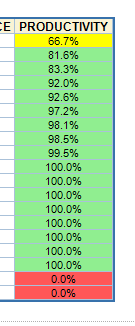
As seen in the image, 0% is being rank at the bottom. Is there a way to sort it such that 0 is at the top?
Thank you.
1 REPLY 1


Barite | Level 11
- Mark as New
- Bookmark
- Subscribe
- Mute
- RSS Feed
- Permalink
- Report Inappropriate Content
Try to apply /order order=
define Productivity / order order=internalanalysis SUM 'Productivity' format=PERCENT10.1 missing STYLE={BACKGROUND=TRAFFIC_INDICATOR. just= center}; run; quit;

Catch up on SAS Innovate 2026
Nearly 200 sessions are now available on demand with the SAS Innovate Digital Pass.
Explore Now →Creating Custom Steps in SAS Studio
Check out this tutorial series to learn how to build your own steps in SAS Studio.

Find more tutorials on the SAS Users YouTube channel.
SAS Training: Just a Click Away
Ready to level-up your skills? Choose your own adventure.
Discussion stats
-
1 reply
-
07-28-2016 04:14 AM
-
1604 views
-
0 likes
-
2 in conversation
-


