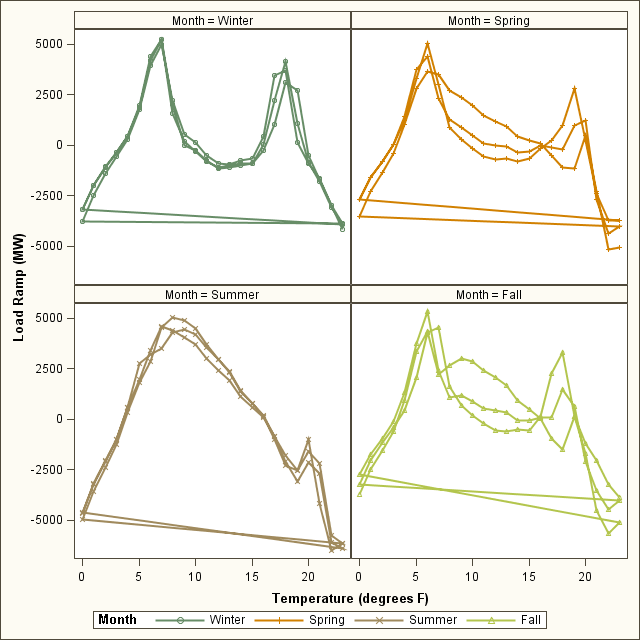
Hi, I'm playing with sgpanel and I'm I need help.
Can I change colors of individual lines? Also how can I get rid of the connecting lines between first and last point?
Here's the code I have:
proc sort data=ramp; by Month hour; run; proc means data=ramp noprint; by Month hour; var delta Temperature; output out=Meanf mean=; run; proc sgplot data=Meanf; series x=Hour y=delta / group=Month MARKERS LINEATTRS = (THICKNESS = 2 PATTERN = SOLID); XAXIS LABEL = 'Hour' GRID VALUES = (0 TO 23 BY 1); YAXIS LABEL = 'LOAD RAMP(MW)'; title 'Monthly Load Ramp Summary'; run; proc format library=work; value season 12,1,2 = 'Winter' 3,4,5 = 'Spring' 6,7,8 = 'Summer' 9,10,11 = 'Fall'; run; proc sgpanel data=Meanf ; panelby month /layout=panel rows=2 columns=2 onepanel ; format month season.; series x=Hour y=delta / group=Month MARKERS LINEATTRS = (THICKNESS = 2 PATTERN = SOLID) BREAK; colaxis label="Temperature (degrees F)"; rowaxis label="Load Ramp (MW)"; title 'Load Ramp vs Temperature (overall)'; run;
You might be better off adding a SEASON variable based on your Month. The Format applied to month is honored for grouping in general so you get a single color per season.
The connection is caused most likely by each month having the same "hour". I would try inserting a record at the end of each month with a missing value for hour and delta to create a break in the series.
Something like:
proc sort data=ramp;
by Month hour;
run;
data ramp1;
set ramp;
by month;
Season= put(month,season.);
output;
if last.month then do;
hour=.;
delta=.;
output;
end;
run;
Use ramp1 with panel by season and don't use the season format in the sgpanel code.
You might be better off adding a SEASON variable based on your Month. The Format applied to month is honored for grouping in general so you get a single color per season.
The connection is caused most likely by each month having the same "hour". I would try inserting a record at the end of each month with a missing value for hour and delta to create a break in the series.
Something like:
proc sort data=ramp;
by Month hour;
run;
data ramp1;
set ramp;
by month;
Season= put(month,season.);
output;
if last.month then do;
hour=.;
delta=.;
output;
end;
run;
Use ramp1 with panel by season and don't use the season format in the sgpanel code.
April 27 – 30 | Gaylord Texan | Grapevine, Texas
Walk in ready to learn. Walk out ready to deliver. This is the data and AI conference you can't afford to miss.
Register now and lock in 2025 pricing—just $495!
Check out this tutorial series to learn how to build your own steps in SAS Studio.

Find more tutorials on the SAS Users YouTube channel.
Ready to level-up your skills? Choose your own adventure.