- Home
- /
- Programming
- /
- Enterprise Guide
- /
- Re: Run a procedure with parameters from Excel or with a VBscript
- RSS Feed
- Mark Topic as New
- Mark Topic as Read
- Float this Topic for Current User
- Bookmark
- Subscribe
- Mute
- Printer Friendly Page


- Mark as New
- Bookmark
- Subscribe
- Mute
- RSS Feed
- Permalink
- Report Inappropriate Content
Hi Chris,
New to SAS and having trouble create the app object ... something to the effect that the ActiveX can't create the object.
What are the prerequisites/dependence for making this work?
Dim app
Set app = CreateObject("SASEGObjectModel.Application.5.1")
I'm tring to fire up and run sas from within a VBA context/Excel 2010.
Any help is appreciated.
Thanks in advance.
-Joe
Accepted Solutions


- Mark as New
- Bookmark
- Subscribe
- Mute
- RSS Feed
- Permalink
- Report Inappropriate Content
You can try this from a command prompt to register the automation API in the 32-bit registry:
c:\Windows\Microsoft.NET\Framework\v4.0.30319\regasm /codebase c:\Program Files\SASHome\SASEnterpriseGuide\5.1\sasegscripting.dll
Chris
- Mark as New
- Bookmark
- Subscribe
- Mute
- RSS Feed
- Permalink
- Report Inappropriate Content
Are you using the 32-bit version of EG 5.1? Or the 64-bit version? When running from within MS Office, the bitness must match between Office and SAS Enterprise Guide, since they will be in the same process (EXCEL.EXE).
Chris
- Mark as New
- Bookmark
- Subscribe
- Mute
- RSS Feed
- Permalink
- Report Inappropriate Content
64-bit of EG 5.1
Looks like 32-bit of Excel. I hope that's not a show stopper.
-Joe
- Mark as New
- Bookmark
- Subscribe
- Mute
- RSS Feed
- Permalink
- Report Inappropriate Content
FYI. Someone else in my group with the same setup seem NOT to have the same difficulty. Wondering in if the .dll need to be registered/certified/other. Let me know you need me to test anything out from this end.
Thanks again.
-Joe
- Mark as New
- Bookmark
- Subscribe
- Mute
- RSS Feed
- Permalink
- Report Inappropriate Content
You can try this from a command prompt to register the automation API in the 32-bit registry:
c:\Windows\Microsoft.NET\Framework\v4.0.30319\regasm /codebase c:\Program Files\SASHome\SASEnterpriseGuide\5.1\sasegscripting.dll
Chris
- Mark as New
- Bookmark
- Subscribe
- Mute
- RSS Feed
- Permalink
- Report Inappropriate Content
Thanks.
That yields the error below. Any other thoughts?
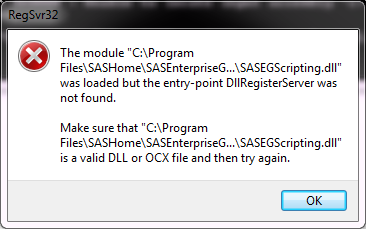
- Mark as New
- Bookmark
- Subscribe
- Mute
- RSS Feed
- Permalink
- Report Inappropriate Content
Are you sure that you ran regasm.exe and not regsvr32.exe ? This is a .NET library -- you need to run regasm.
SEGuide.exe /register also does this, but it might affect only your 64-bit registry which won't make things visible to your Microsoft Excel.
Chris
- Mark as New
- Bookmark
- Subscribe
- Mute
- RSS Feed
- Permalink
- Report Inappropriate Content
Oops. My bad - thought I had pasted your's but must have hit the up arrow instead.
All is well now. Thanks so much.
-Joe

Call for content now open!
It's your turn to help shape SAS Innovate 2027. Share your expertise and inspire the SAS community.
Check out this tutorial series to learn how to build your own steps in SAS Studio.

Find more tutorials on the SAS Users YouTube channel.
SAS Training: Just a Click Away
Ready to level-up your skills? Choose your own adventure.
-
7 replies
-
04-17-2015 09:11 AM
-
4608 views
-
0 likes
-
2 in conversation
-


