BookmarkSubscribeRSS Feed
Will_V
Calcite | Level 5

Hello,

I have only been using SAS for about a month, but I have created a few permanent macros for things I do often.

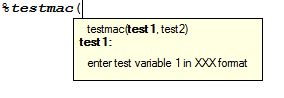
Right now, if I define a macro within a program I will get a drop down menu of available macros when I start typing '%...'  and once I have clicked or typed the macro name, I get a box with information saying the macro variable names and any information I want displayed.
Capture.JPG

Now I want to save my macros to a file and call them from other programs.  I can call the macro using the following code, but it does not display the info box or the drop down list of names when I type the macro name and variables.

filename willmacs 'filename';

options mautosource sasautos=(willmacs sasautos);

%testmac(ABC, DEF)

Is it possible to make EG display the dropdown and infobox?

Thanks for your help and please point me to other threads if this was mentioned before (I did a quick search but could not find anything)

-Will

1 REPLY 1
Quentin
Super User

Hi,

I haven't used 5.1 much, but I don't think it's possible.  As I understand, this auto-complete feature of the EG editor works when the definition of the macro is in the same program.   I don't think it works for autocall macros.  You might try posting this in the Enterprise Guide forum.  There are EG experts  there.

--Q.

sas-innovate-2026-white.png


April 27 – 30 | Gaylord Texan | Grapevine, Texas

Registration is open

Walk in ready to learn. Walk out ready to deliver. This is the data and AI conference you can't afford to miss.
Register now and lock in 2025 pricing—just $495!

Register now

Creating Custom Steps in SAS Studio

Check out this tutorial series to learn how to build your own steps in SAS Studio.

Find more tutorials on the SAS Users YouTube channel.

SAS Training: Just a Click Away

 Ready to level-up your skills? Choose your own adventure.

Browse our catalog!

Discussion stats
  • 1 reply
  • 1250 views
  • 0 likes
  • 2 in conversation
