- Home
- /
- Programming
- /
- Enterprise Guide
- /
- Re: List Report - Adding a page break
- RSS Feed
- Mark Topic as New
- Mark Topic as Read
- Float this Topic for Current User
- Bookmark
- Subscribe
- Mute
- Printer Friendly Page


- Mark as New
- Bookmark
- Subscribe
- Mute
- RSS Feed
- Permalink
- Report Inappropriate Content
Hi!
How do you add in a page break on the List Report? I can see it has been done, but not sure how it was accomplished! See the attachment to show what was done previously. The page break is on sort name.
I was using the List Report Wizard to try to recreate this.
Thanks!
Accepted Solutions
- Mark as New
- Bookmark
- Subscribe
- Mute
- RSS Feed
- Permalink
- Report Inappropriate Content
Hi!
A colleague helped me find how to add a page break to a list report.
From the output of a query, select Describe (top tool bar)>List Report Wizard >There are 4 screens. Next to get to second screen
Then select edit on the upper right. > Assign Columns > on the bottom right, add the feld for the page break in the "Create a separate table for each value of:
And then the list report will do a page break! See attached for visual.
Thanks for looking!
Jo


- Mark as New
- Bookmark
- Subscribe
- Mute
- RSS Feed
- Permalink
- Report Inappropriate Content
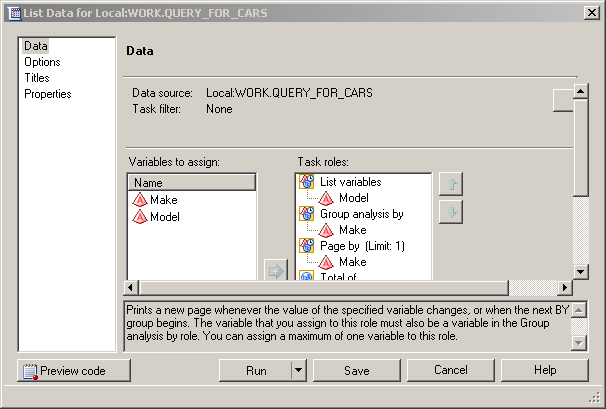
This can be done by the PAGEBY statement in Proc Print: aka in EG, the "List data" task. If I have interpreted what you're aiming for correctly.
- Mark as New
- Bookmark
- Subscribe
- Mute
- RSS Feed
- Permalink
- Report Inappropriate Content
Hi!
A colleague helped me find how to add a page break to a list report.
From the output of a query, select Describe (top tool bar)>List Report Wizard >There are 4 screens. Next to get to second screen
Then select edit on the upper right. > Assign Columns > on the bottom right, add the feld for the page break in the "Create a separate table for each value of:
And then the list report will do a page break! See attached for visual.
Thanks for looking!
Jo

Catch up on SAS Innovate 2026
Nearly 200 sessions are now available on demand with the SAS Innovate Digital Pass.
Explore Now →Check out this tutorial series to learn how to build your own steps in SAS Studio.

Find more tutorials on the SAS Users YouTube channel.
SAS Training: Just a Click Away
Ready to level-up your skills? Choose your own adventure.
-
2 replies
-
01-17-2017 11:29 AM
-
3563 views
-
1 like
-
2 in conversation
-


