- Home
- /
- Programming
- /
- Enterprise Guide
- /
- Is variable _NUMERIC_ still available for SAS EG 7.1 ?
- RSS Feed
- Mark Topic as New
- Mark Topic as Read
- Float this Topic for Current User
- Bookmark
- Subscribe
- Mute
- Printer Friendly Page


- Mark as New
- Bookmark
- Subscribe
- Mute
- RSS Feed
- Permalink
- Report Inappropriate Content
Hello, Everyone,
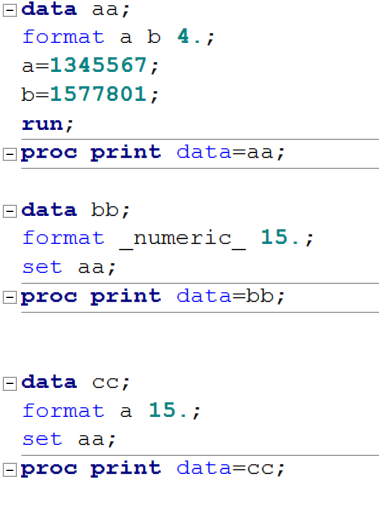
I try to use _NUMERIC_ to change the output format of all numeric variables to avoid scientific notation. However, the code below doesn't work.
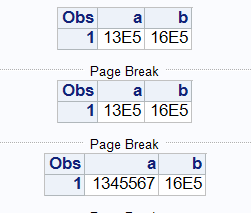
The result is:
Thanks for your help.


- Mark as New
- Bookmark
- Subscribe
- Mute
- RSS Feed
- Permalink
- Report Inappropriate Content
Just a few points to consider ...
If you are not going to use scientific notation, just how are you going to express 1345567 in only 4 characters?
_NUMERIC_ is still part of the software, however its meaning is mildly tricky when used in a DATA step. There, it means "all the numeric variables that have been defined so far". Since you put the FORMAT _NUMERIC_ statement before the SET statement, no numeric variables have been defined at that point. So the FORMAT statement has no impact. If you move it to after the SET statement, you will see a difference.


- Mark as New
- Bookmark
- Subscribe
- Mute
- RSS Feed
- Permalink
- Report Inappropriate Content
Please post code in a code box opened using the forum {i} menu icon.
if we want to test some code it is much easier for us to copy it from the code box instead of having to completely retype code posted as a picture. If your example code runs more than a very few lines I doubt many of the users here will bother to retype it to test.

Catch up on SAS Innovate 2026
Nearly 200 sessions are now available on demand with the SAS Innovate Digital Pass.
Explore Now →Check out this tutorial series to learn how to build your own steps in SAS Studio.

Find more tutorials on the SAS Users YouTube channel.
SAS Training: Just a Click Away
Ready to level-up your skills? Choose your own adventure.
-
2 replies
-
09-29-2017 09:40 AM
-
1620 views
-
0 likes
-
3 in conversation
-


