- Home
- /
- Programming
- /
- Enterprise Guide
- /
- How can I schedule a EGP with prompts?
- RSS Feed
- Mark Topic as New
- Mark Topic as Read
- Float this Topic for Current User
- Bookmark
- Subscribe
- Mute
- Printer Friendly Page


- Mark as New
- Bookmark
- Subscribe
- Mute
- RSS Feed
- Permalink
- Report Inappropriate Content
Hi,
Currently I'm using a enterprise scheduler "Tidal" to schedule my SAS EGP processes.
It triggers a vbscript which intern runs EGP Process.
But few of my EGP processes has prompts and I was wondering how can I schedule them?
Is there any way I can map these prompt's values before scheduler triggers them?
Thanks


- Mark as New
- Bookmark
- Subscribe
- Mute
- RSS Feed
- Permalink
- Report Inappropriate Content
When scheduled it is going to run in batch. Unless you can find some zombie that can type on the keyboard and see the screen that is connected to that batch process (other batch world) there is no way for interaction. With Sp's (metadata) and LSF is solved in an other way.


- Mark as New
- Bookmark
- Subscribe
- Mute
- RSS Feed
- Permalink
- Report Inappropriate Content
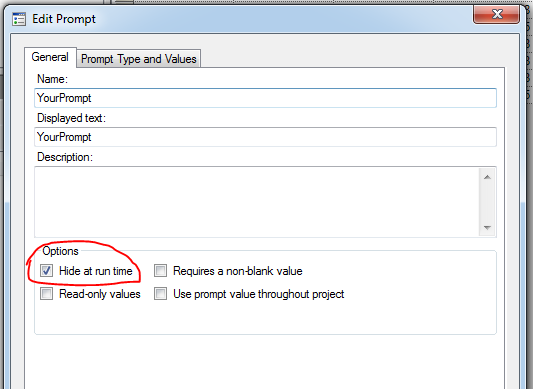
What do you mean by "map these prompt's values before scheduler triggers them"? Prompts are macro variables that assigned to Macros in the form of Macro parameter. In this context, like all other macro parameters, they CAN be assigned with DEFAULT values. Here is how: Go to the Prompt Manager, open up the prompt you want to modify:
1.
2.
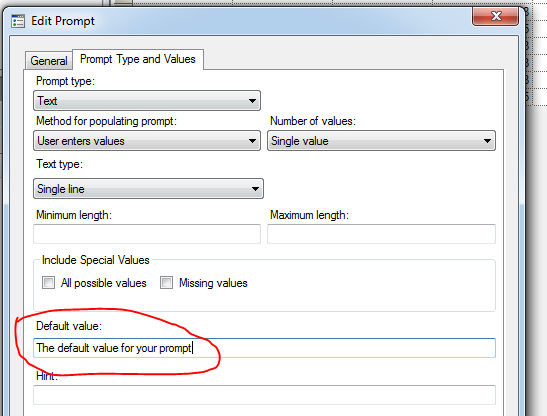
Doing so will allow you to run the EGP without popping up the prompts, where the prompts will be using default values.
Good luck,
Haikuo
- Mark as New
- Bookmark
- Subscribe
- Mute
- RSS Feed
- Permalink
- Report Inappropriate Content
Thanks , I understand that we can set default value for prompts. But this way we have to modify prompt and SP for every run and so it can't be scheduled in production.
My question is that how can we provide prompt values for every scheduled run?
Currently i have designed my solution this way:
- Update prompt values in an excel sheet before scheduled date
- SAS process imports that excel in to sas data set
- It creates macro variables which can be then used as prompt values
But here I have a set of business users who doesn't know much of sas coding and mainly they create process via point & click options.
Is there any way they can also schedule their processes by automating the prompt values?
- Mark as New
- Bookmark
- Subscribe
- Mute
- RSS Feed
- Permalink
- Report Inappropriate Content
If step 1,2, 3 is already in place, I can't see why your users can't feed the parameters by updating their own spreadsheets (step 1), and then your scheduled SAS process will take over from step 2 and move on?
It may or may not suit you, I would convert every 'production process' into STP, where I have much more control, not just in term of coding, but also STP supports better prompts (eg. cascade prompts).
Good luck,
Haikuo


- Mark as New
- Bookmark
- Subscribe
- Mute
- RSS Feed
- Permalink
- Report Inappropriate Content
Extract the code from the projects into .sas program files.
Set up an include that accepts values from the scheduler (usually via environment variables) and puts them into predefined macro variables (like param1, param2, ...., paramx)
Write your codes so that they use the predefined parms as control input (replacing the prompt values).
This means that user code must be evaluated by the SAS admin group, but this should be done anyway before allowing batch processing by the central scheduling.
We used tidal once as an intermediate tool between Control-M and the SAS server (UNIX). We have since set up a direct control of the UNIX server by Control-M, using nothing but UNIX standard tools (sftp/ssh, shell scripts).

Catch up on SAS Innovate 2026
Nearly 200 sessions are now available on demand in the Innovate Hub.
Watch Now →Check out this tutorial series to learn how to build your own steps in SAS Studio.

Find more tutorials on the SAS Users YouTube channel.
SAS Training: Just a Click Away
Ready to level-up your skills? Choose your own adventure.
-
5 replies
-
11-04-2014 01:37 PM
-
4212 views
-
0 likes
-
4 in conversation
-


