- Home
- /
- Programming
- /
- Enterprise Guide
- /
- Re: High DPI Display Problem / small icons / bigger font then rows
- RSS Feed
- Mark Topic as New
- Mark Topic as Read
- Float this Topic for Current User
- Bookmark
- Subscribe
- Mute
- Printer Friendly Page


- Mark as New
- Bookmark
- Subscribe
- Mute
- RSS Feed
- Permalink
- Report Inappropriate Content
Hi,
i installed the last version of EG 7.13 HF5 (7.100.3.5486) (64-bit) (Windows 10, .net framework 4.6.2, resolution 3200x1800)
i got the following problem
the icons are too small and the text in tables is bigger then the rows.
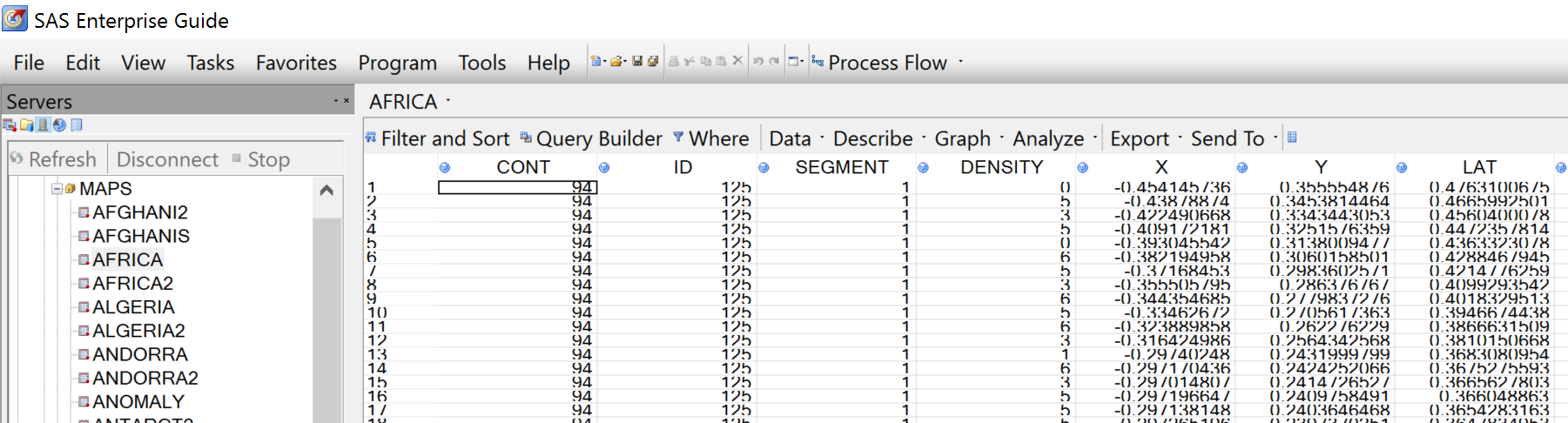
i installed the last net framework, like suggested on following link
http://support.sas.com/kb/56/015.html
with out change
if i set the scaling in Windows to 100% problem stay only everything is smaller
some suggestion ? ideas ?


- Mark as New
- Bookmark
- Subscribe
- Mute
- RSS Feed
- Permalink
- Report Inappropriate Content


- Mark as New
- Bookmark
- Subscribe
- Mute
- RSS Feed
- Permalink
- Report Inappropriate Content
I haven't confirm, but there is a good chance this has been resolved in EG 8.1 and 8.2, since the application shell is now WPF (scales better) and uses scalable icons (SVG). (However, the data grid is still Winforms, so it may not have improved in the high resolution.)
Casey
Register today and join us virtually on June 16!
sasglobalforum.com | #SASGF
View now: on-demand content for SAS users

Catch up on SAS Innovate 2026
Nearly 200 sessions are now available on demand with the SAS Innovate Digital Pass.
Explore Now →Check out this tutorial series to learn how to build your own steps in SAS Studio.

Find more tutorials on the SAS Users YouTube channel.
SAS Training: Just a Click Away
Ready to level-up your skills? Choose your own adventure.
-
2 replies
-
07-03-2017 02:25 PM
-
3206 views
-
0 likes
-
3 in conversation
-


