- Home
- /
- Programming
- /
- Enterprise Guide
- /
- Re: Function to locate the last character in a string
- RSS Feed
- Mark Topic as New
- Mark Topic as Read
- Float this Topic for Current User
- Bookmark
- Subscribe
- Mute
- Printer Friendly Page


- Mark as New
- Bookmark
- Subscribe
- Mute
- RSS Feed
- Permalink
- Report Inappropriate Content
Hi,
I have a number field & some values end in a '9' & I want to round those to the next number - that is '29' becomes '30'.
I know I could use a 'Round' type function but I'd like to know how I can firstly locate the last integer from a number value & if it is a '9' add 1 to it, otherwise leave the value as it is.
In excel I would add this - =IF(RIGHT(E2,1)="9",E2+1,E2).
I looked at the RIGHT, SUBSTR & SUBSTRN functions but I suppose they are for text??
Can anyone suggest the best answer? Thanks


- Mark as New
- Bookmark
- Subscribe
- Mute
- RSS Feed
- Permalink
- Report Inappropriate Content
What does your data look like ?
data have;
input Score;
if mod(score,10)=9 then score=score+1;
cards;
119
110
100
114
120
115
106
109
;
run;
Ksharp
- Mark as New
- Bookmark
- Subscribe
- Mute
- RSS Feed
- Permalink
- Report Inappropriate Content
Hi Ksharp,
The Field contains only Integers such as 0, 29, 30, 59, 150, 99 etc, so I want the ones that end in '0' to be left alone.
- Mark as New
- Bookmark
- Subscribe
- Mute
- RSS Feed
- Permalink
- Report Inappropriate Content
so what output do you want ?
- Mark as New
- Bookmark
- Subscribe
- Mute
- RSS Feed
- Permalink
- Report Inappropriate Content
As advised in the question;
I'd like to know how I can firstly locate the last integer from a number value & if it is a '9' add 1 to it, otherwise leave the value as it is. '29' becomes '30'


- Mark as New
- Bookmark
- Subscribe
- Mute
- RSS Feed
- Permalink
- Report Inappropriate Content
Have you tried Ksharp's answer?
Another option
Convert the number to a char and then use the similar logic from your excel
Barry
- Mark as New
- Bookmark
- Subscribe
- Mute
- RSS Feed
- Permalink
- Report Inappropriate Content
Hi Barry Stevens,
No I haven't tried KSharps answer as I need it as an advanced expression - such as the one I posted as what Excel would accept.
I should have explained that, so I'm looking for someting I can add into the Advanced Expression area of SAS EG 4.3.
I didn't mean to be rude KSharp, I also answer Forum questions & if someting is obvious, I reuse what I've already written.
I think I did explain the bit about strings & numbers clearly enough, I don't know what function to use & these (String) ones didn't work, so I'm asking what function is best here.
Any suggests?
- Mark as New
- Bookmark
- Subscribe
- Mute
- RSS Feed
- Permalink
- Report Inappropriate Content
That is exactly what I am doing.
- Mark as New
- Bookmark
- Subscribe
- Mute
- RSS Feed
- Permalink
- Report Inappropriate Content

- Mark as New
- Bookmark
- Subscribe
- Mute
- RSS Feed
- Permalink
- Report Inappropriate Content
Thanks, but if you mean the script your posted above, it's obviously not going to work in the Advanced Expression area of SAS EG 4.3.
data have;
input Score;
if mod(score,10)=9 then score=score+1;
cards;
119
110
100
114
120
115
106
109
;
run;
- Mark as New
- Bookmark
- Subscribe
- Mute
- RSS Feed
- Permalink
- Report Inappropriate Content
score=ifn(mod(score,10)=9,score+1,score)
- Mark as New
- Bookmark
- Subscribe
- Mute
- RSS Feed
- Permalink
- Report Inappropriate Content
Thanks Ksharp,
Unfortunately, this doesn't work.
to use it, I replaced the 'score' value with my field name & got the results of '0's & '1's instead of the field value + 1.
Existing values ending in '0' such as '40' were displayed as '1' & values ending in '9' such as '29' were displayed as '0' ??


- Mark as New
- Bookmark
- Subscribe
- Mute
- RSS Feed
- Permalink
- Report Inappropriate Content
Hi,
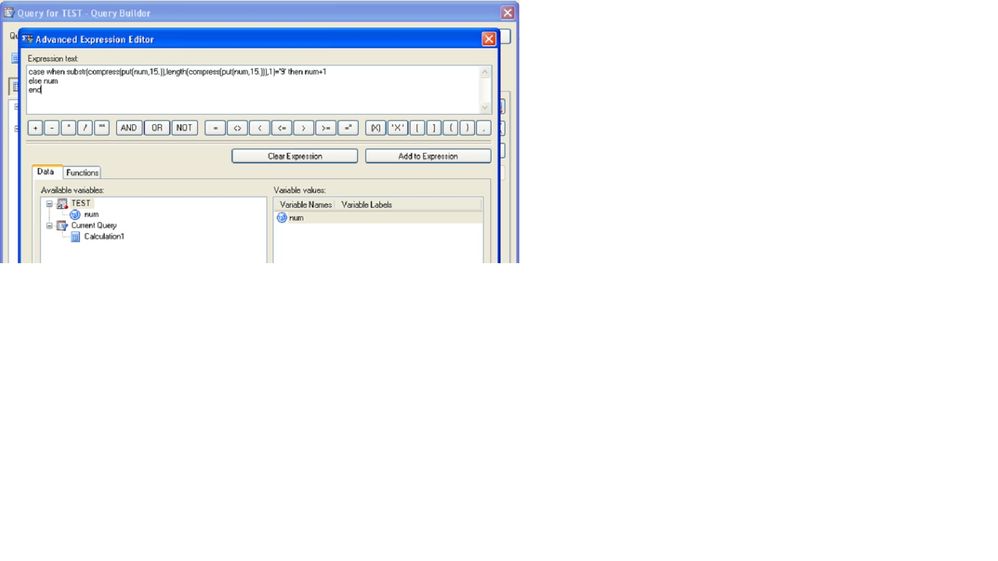
In the query builder you can use expression like this to create a calculated column:
case when substr(compress(put(num,15.)), length(compress(put(num,15.))),1)='9' then num+1;
else num
end
I am not sure if you are looking for the same or not.
-Saurabh


- Mark as New
- Bookmark
- Subscribe
- Mute
- RSS Feed
- Permalink
- Report Inappropriate Content
I think has it. When adding your expression in the Query Builder, don't include the initial "score =". Here's an example in the context of PROC SQL, which is how the Query Builder will use it.
data test;
input num;
datalines;
45
89
77
9
45
0
;
proc sql;
create table fix as
select num,
/* BEGIN EXP */ ifn( mod(num,10) = 9,num+1,num) /* END EXP */
as want
from test;
quit;
Chris

Catch up on SAS Innovate 2026
Nearly 200 sessions are now available on demand in the Innovate Hub.
Watch Now →Check out this tutorial series to learn how to build your own steps in SAS Studio.

Find more tutorials on the SAS Users YouTube channel.
SAS Training: Just a Click Away
Ready to level-up your skills? Choose your own adventure.
-
13 replies
-
07-01-2013 09:48 PM
-
6360 views
-
0 likes
-
5 in conversation
-


