- Home
- /
- Programming
- /
- Enterprise Guide
- /
- Re: Conditional Format top 5 by colouring cell and text
- RSS Feed
- Mark Topic as New
- Mark Topic as Read
- Float this Topic for Current User
- Bookmark
- Subscribe
- Mute
- Printer Friendly Page


- Mark as New
- Bookmark
- Subscribe
- Mute
- RSS Feed
- Permalink
- Report Inappropriate Content
Hi All,
I'm wanting to know how to conditional format the top 5 results (from 28) for each day of the week in a proc Report. The final output is into PDF.
Proc Report Data=work.Max_Abandon_New2_Trans style(report)=[BORDERCOLOR=BLACK BACKGROUND=#FFFFFF]
	STYLE(HEADER)={BACKGROUND=#008080 COLOR=WHITE FONTWEIGHT=BOLD BORDERCOLOR=BLACK}
	style(Column)={BORDERCOLOR=BLACK background=White COLOR=Black};
	Columns MBL Cluster day_2 day_3 day_4 day_5 day_6 day_7 day_1;
	Define MBL / DISPLAY 'Business Line' Order;
	Define Cluster / DISPLAY 'Cluster';
	Define day_2 / DISPLAY 'Monday' format=TIME8. ;
	Define day_3 / DISPLAY 'Tuesday' format=TIME8. ;
	Define day_4 / DISPLAY 'Wednesday' format=TIME8. ;
	Define day_5 / DISPLAY 'Thursday' format=TIME8. ;
	Define day_6 / DISPLAY 'Friday' format=TIME8. ;
	Define day_7 / DISPLAY 'Saturday' format=TIME8. ;
	Define day_1 / DISPLAY 'Sunday' format=TIME8. ;

	title3 color=Black font=Arial BOLD "Maximum Abandon Time (Week Ending &Excel_Date_Prompt)";
RUN;
This is what I'm looking for in the output.
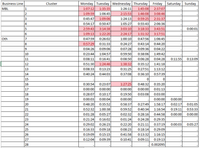
Any help is appreciated.
Cheers
I have added the following code that allows me to format anything over 1 Hour
	compute day_2;

		if day_2 > 3600 then
			call define(_col_, 'style', 'style=[background= #E599A7 COLOR=#CC1B2B ]');
	EndComp;
Can I make it do the 'top 5' though?
By using the following code I get the conditional formatting for the week however if it is a part Week ( Monday - Wednesday) way through the week it returns
ERROR: Variable day_5 is not on file WORK.MAX_ANSWER_NEW2_TRANS.
compute day_2;
		if day_2 > 3600 then
			call define(_col_, 'style', 'style=[background= #E599A7 COLOR=#CC1B2B ]');
	EndComp;

	compute day_3;
		if day_3 > 3600 then
			call define(_col_, 'style', 'style=[background= #E599A7 COLOR=#CC1B2B ]');
	EndComp;

	compute day_4;
		if day_4 > 3600 then
			call define(_col_, 'style', 'style=[background= #E599A7 COLOR=#CC1B2B ]');
	EndComp;

	compute day_5;
		if day_5 > 3600 then
			call define(_col_, 'style', 'style=[background= #E599A7 COLOR=#CC1B2B ]');
	EndComp;

	compute day_6;
		if day_6 > 3600 then
			call define(_col_, 'style', 'style=[background= #E599A7 COLOR=#CC1B2B ]');
	EndComp;
How can I get it to pass on the data (Days) that have not been populated yet?


- Mark as New
- Bookmark
- Subscribe
- Mute
- RSS Feed
- Permalink
- Report Inappropriate Content
Each variable should have a compute block.
or for the convenient , make a traffic light format .

compute day_2;

		if day_2 > 3600 then
			call define(_col_, 'style', 'style=[background= #E599A7 COLOR=#CC1B2B ]');
	EndComp;


compute day_3;

		if day_3 > 3600 then
			call define(_col_, 'style', 'style=[background= #E599A7 COLOR=#CC1B2B ]');
	EndComp;


compute day_4;

		if day_4> 3600 then
			call define(_col_, 'style', 'style=[background= #E599A7 COLOR=#CC1B2B ]');
	EndComp;
- Mark as New
- Bookmark
- Subscribe
- Mute
- RSS Feed
- Permalink
- Report Inappropriate Content
Tghanks K-Sharp,
I have Compute code for each day.
compute day_2;

		if day_2 > 3600 then
			call define(_col_, 'style', 'style=[background= #E599A7 COLOR=#CC1B2B ]');
	EndComp;

	compute day_3;

		if day_3 > 3600 then
			call define(_col_, 'style', 'style=[background= #E599A7 COLOR=#CC1B2B ]');
	EndComp;

	compute day_4;

		if day_4 > 3600 then
			call define(_col_, 'style', 'style=[background= #E599A7 COLOR=#CC1B2B ]');
	EndComp;

	compute day_5;

		if day_5 > 3600 then
			call define(_col_, 'style', 'style=[background= #E599A7 COLOR=#CC1B2B ]');
	EndComp;

	compute day_6;

		if day_6 > 3600 then
			call define(_col_, 'style', 'style=[background= #E599A7 COLOR=#CC1B2B ]');
	EndComp;
However as there is no data past say day_5 it comes up with an error. The error is what I'm trying to get around as this is a weekly report that is updated on a daily basis
Cheers
- Mark as New
- Bookmark
- Subscribe
- Mute
- RSS Feed
- Permalink
- Report Inappropriate Content
HoHo, you need make a macro variable from dictioanary table 'dictionary.columns' to hold those existed variables.
- Mark as New
- Bookmark
- Subscribe
- Mute
- RSS Feed
- Permalink
- Report Inappropriate Content
Thanks Ksharp - using a macro variable from dictioanary table 'dictionary.columns' is a little outside my experience.
Thanks for the help though

Catch up on SAS Innovate 2026
Nearly 200 sessions are now available on demand in the Innovate Hub.
Watch Now →Check out this tutorial series to learn how to build your own steps in SAS Studio.

Find more tutorials on the SAS Users YouTube channel.
SAS Training: Just a Click Away
Ready to level-up your skills? Choose your own adventure.
-
4 replies
-
03-29-2017 08:20 PM
-
2327 views
-
0 likes
-
2 in conversation
-

