- Home
- /
- Analytics
- /
- SAS Data Science
- /
- Re: Interpretation of exponentiated coefficient for categorical variab...
- RSS Feed
- Mark Topic as New
- Mark Topic as Read
- Float this Topic for Current User
- Bookmark
- Subscribe
- Mute
- Printer Friendly Page


- Mark as New
- Bookmark
- Subscribe
- Mute
- RSS Feed
- Permalink
- Report Inappropriate Content
Accepted Solutions
- Mark as New
- Bookmark
- Subscribe
- Mute
- RSS Feed
- Permalink
- Report Inappropriate Content
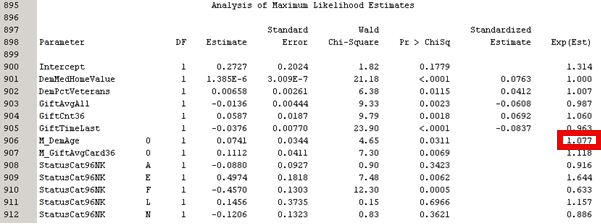
I liked your suggestion, so I tried changing the input coding. Under Model Options -> Input Coding -> GLM.
With deviation coding the values are not the same:
Analysis of Maximum Likelihood Estimates
Parameter DF Estimate Error Chi-Square Pr > ChiSq Estimate Exp(Est)
M_DemAge 0 1 0.0741 0.0344 4.65 0.0311 1.077
Odds Ratio Estimates
Point Effect Estimate
M_DemAge 0 vs 1 1.160
With GLM coding, the values are the same. Thanks!!
Analysis of Maximum Likelihood Estimates
Parameter DF Estimate Error Chi-Square Pr > ChiSq Estimate Exp(Est)
M_DemAge 0 1 0.1389 0.0794 3.06 0.0802 1.149
Odds Ratio Estimates
Point Effect Estimate
M_DemAge 0 vs 1 1.149


- Mark as New
- Bookmark
- Subscribe
- Mute
- RSS Feed
- Permalink
- Report Inappropriate Content
It should be the same as your odds ratio table, and it should be for a specific level against reference table, assuming you've set the coding system to be the same.
In this case it looks like it's Level=0 against whatever your reference is.
If the variable is an indicator variable with 2 levels this makes sense.
If you're not getting the same as your odds ratio it's likely because you haven't specified the categorical variables to use the referential=PARAM coding system, but the GLM coding system.
- Mark as New
- Bookmark
- Subscribe
- Mute
- RSS Feed
- Permalink
- Report Inappropriate Content
I liked your suggestion, so I tried changing the input coding. Under Model Options -> Input Coding -> GLM.
With deviation coding the values are not the same:
Analysis of Maximum Likelihood Estimates
Parameter DF Estimate Error Chi-Square Pr > ChiSq Estimate Exp(Est)
M_DemAge 0 1 0.0741 0.0344 4.65 0.0311 1.077
Odds Ratio Estimates
Point Effect Estimate
M_DemAge 0 vs 1 1.160
With GLM coding, the values are the same. Thanks!!
Analysis of Maximum Likelihood Estimates
Parameter DF Estimate Error Chi-Square Pr > ChiSq Estimate Exp(Est)
M_DemAge 0 1 0.1389 0.0794 3.06 0.0802 1.149
Odds Ratio Estimates
Point Effect Estimate
M_DemAge 0 vs 1 1.149
- Mark as New
- Bookmark
- Subscribe
- Mute
- RSS Feed
- Permalink
- Report Inappropriate Content
Yeah, that's what I was trying to say in a roundabout way 🙂

Catch up on SAS Innovate 2026
Nearly 200 sessions are now available on demand in the Innovate Hub.
Watch Now →Use this tutorial as a handy guide to weigh the pros and cons of these commonly used machine learning algorithms.

Find more tutorials on the SAS Users YouTube channel.
-
3 replies
-
02-19-2016 11:28 AM
-
3963 views
-
3 likes
-
2 in conversation
-


