Turn on suggestions
Auto-suggest helps you quickly narrow down your search results by suggesting possible matches as you type.
Showing results for
- Home
- /
- Programming
- /
- ODS Reports
- /
- Re: don't merge empty cells when title of proc report & ods excel (ins...
Options
- RSS Feed
- Mark Topic as New
- Mark Topic as Read
- Float this Topic for Current User
- Bookmark
- Subscribe
- Mute
- Printer Friendly Page
🔒 This topic is solved and locked.
Need further help from the community? Please
sign in and ask a new question.


Quartz | Level 8
- Mark as New
- Bookmark
- Subscribe
- Mute
- RSS Feed
- Permalink
- Report Inappropriate Content
Posted 04-15-2022 04:27 AM
(2503 views)
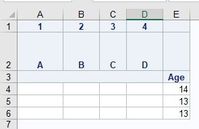
When I use ods excel & proc report, cells of sequentialley empty in title is united.
I want to avoid this 3rd line in title.
data d_out;
 set sashelp.class;
 attrib col1 - col4 length = $20;
 call missing(of col1 - col4);
run;

ods excel file= "D:\test.xlsx";
proc report data=d_out(obs=3)
 split="#"
 out = _O_REP
;
    column
  ("1" ("A" ("" ("" col1))))
  ("2" ("B" ("" ("" col2))))
  ("3" ("C" ("" ("" col3))))
  ("4" ("D" ("" ("" col4))))
   age
    ;
    define col1 / display "";
    define col2 / display "";
    define col3 / display "";
    define col4 / display "";

    define age / display;
run;
ods excel close;
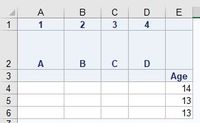
I want to insert break/boundary like this. (insert blank as dummy is also OK.)
Related QA = using across which I don' t use.
https://communities.sas.com/t5/ODS-and-Base-Reporting/Proc-Report-Create-Border-and-Title-should-be-...
Thank you for your help.
1 ACCEPTED SOLUTION
Accepted Solutions
Quartz | Level 8
- Mark as New
- Bookmark
- Subscribe
- Mute
- RSS Feed
- Permalink
- Report Inappropriate Content
I solve it with split.
proc report data=d_out(obs=3)
 split="#"
 out = _O_REP
;
    column
  ("1" ("A" ("" ("" col1))))
  ("2" ("B" ("" ("" col2))))
  ("3" ("C" ("" ("" col3))))
  ("4" ("D" ("" ("" col4))))
   age
    ;
    define col1 / display "#";
    define col2 / display "#";
    define col3 / display "#";
    define col4 / display "";

    define age / display;

run;
2 REPLIES 2
Quartz | Level 8
- Mark as New
- Bookmark
- Subscribe
- Mute
- RSS Feed
- Permalink
- Report Inappropriate Content
This doesn't work.
define col2 / display "" style(column)=[ tagattr="merge:no"];
define col2 / display "" style(column)=[ tagattr="merge:no"];
Quartz | Level 8
- Mark as New
- Bookmark
- Subscribe
- Mute
- RSS Feed
- Permalink
- Report Inappropriate Content
I solve it with split.
proc report data=d_out(obs=3)
 split="#"
 out = _O_REP
;
    column
  ("1" ("A" ("" ("" col1))))
  ("2" ("B" ("" ("" col2))))
  ("3" ("C" ("" ("" col3))))
  ("4" ("D" ("" ("" col4))))
   age
    ;
    define col1 / display "#";
    define col2 / display "#";
    define col3 / display "#";
    define col4 / display "";

    define age / display;

run;
Catch up on SAS Innovate 2026
Nearly 200 sessions are now available on demand in the Innovate Hub.
Watch Now →How to Concatenate Values
Learn how use the CAT functions in SAS to join values from multiple variables into a single value.

Find more tutorials on the SAS Users YouTube channel.
SAS Training: Just a Click Away
Ready to level-up your skills? Choose your own adventure.
Discussion stats
-
2 replies
-
04-15-2022 04:27 AM
-
2504 views
-
0 likes
-
1 in conversation
-

