- Home
- /
- Programming
- /
- ODS Reports
- /
- Proc Template - Margin for title and data
- RSS Feed
- Mark Topic as New
- Mark Topic as Read
- Float this Topic for Current User
- Bookmark
- Subscribe
- Mute
- Printer Friendly Page


- Mark as New
- Bookmark
- Subscribe
- Mute
- RSS Feed
- Permalink
- Report Inappropriate Content
Hi,
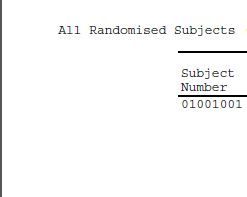
When I create PDF output title is starting from .5 in left and body is starting from 1.25in. I am bit confused what statement should be chnaged in proc template to start both from same.
I attached here the file which I am facing issue.
my code:
proc template;
define style std/store=templates;
parent = Styles.rtf ;
class fonts /
'TitleFont' = ("Courier, Times Roman, Times", 8pt )
'TitleFont2' = ("Courier, Times Roman, Times", 8pt )
'footFont' = ("Courier, Times Roman, Times", 8pt )
'StrongFont' = ("Courier, Times Roman, Times", 8pt)
'EmphasisFont' = ("Courier, Times Roman, Times", 8pt,Italic)
'headingEmphasisFont' = ("Courier, Times Roman, Times", 8pt)
'headingFont' = ("Courier, Times Roman, Times", 8pt)
'docFont' = ("Courier, Times Roman, Times",8pt)
'FixedEmphasisFont' = ("Courier, Times Roman, Times", 8pt)
'FixedStrongFont' = ("Courier, Times Roman, Times", 8pt)
'FixedHeadingFont' = ("Courier, Times Roman, Times", 8pt)
'BatchFixedFont' = ("Courier, Times Roman, Times", 8pt)
'FixedFont' = ("Courier, Times Roman, Times", 8pt) ;
class color_list / 'link'= blue 'bgH' = white 'bgT' = white 'bgD' = white 'fg' = black 'bg' = white ;
style Table from Output / cellpadding=2pt cellspacing=0.25pt just=center rules = groups frame= above ;
replace headersandFooters from cell/ font = fonts('HeadingFont') foreground = blank background = white;
class systemtitle / protectspecialchars=OFF asis=ON ;
class systemfooter / font=Fonts('footFont') protectspecialchars=OFF asis=ON ;
class text / 'continued' = " " ;
class continued / pretext=text('continued') width=_undef_ frame=void rules=none cellpadding = .6pt cellspacing = 0 ;
class header / protectspecialchars=off ;
class data / protectspecialchars=off ;
class rowheader / protectspecialchars=off ;
class usertext / protectspecialchars=off ;
class byline / protectspecialchars=off ;
/* style header from headersandfooters / protectspecialchars=OFF just=center cellpadding=0 cellspacing=0 font_weight=bold; */ *controlling Column Names*;
style table from output / just=center frame=above rules=groups background=color_list('bgT');
style data from cell / outputwidth=100% cellpadding=1 cellspacing=1 asis=on protectspecialchars=OFF nobreakspace=OFF asis=ON;
style body from document / leftmargin=0.5in rightmargin=0.5in topmargin=1.0in bottommargin=1.0in;
end;
quit;
%mend std_ods_style;
%std_ods_style;
.
Accepted Solutions


- Mark as New
- Bookmark
- Subscribe
- Mute
- RSS Feed
- Permalink
- Report Inappropriate Content
Hi:
Without going into the world of templates, I can illustrate the opposite of what you're seeing, by stretching the table output to 100% -- which means it will take up all the space from margin to margin, as shown below (for RTF):
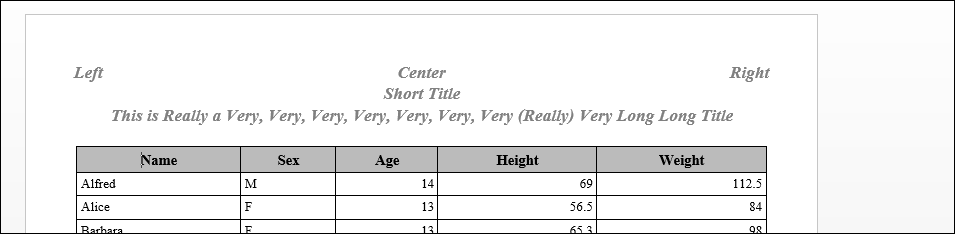
By default, ODS will center the table output within the margins for paged destinations like RTF and PDF. So either you use NOCENTER to make the table flush left or you stretch the table using width=100%, as shown in my code below.
With short titles or long titles, they too will be centered in the margins. If you use J=L or J=R in the title, you can see where the margins are as I set them in the OPTIONS statement.
cynthia
Code below:
options topmargin=.5in bottommargin=.5in leftmargin=.5in rightmargin=.5in;
ods rtf file='c:\temp\stretch.rtf';

title1 j=l 'Left' j=c 'Center' j=r 'Right';
title2 'Short Title';
title3 'This is Really a Very, Very, Very, Very, Very, Very, Very (Really) Very Long Long Title';
proc report data=sashelp.class
     style(report)={width=100%};
run;

ods rtf close;- Mark as New
- Bookmark
- Subscribe
- Mute
- RSS Feed
- Permalink
- Report Inappropriate Content
Hi:
Without going into the world of templates, I can illustrate the opposite of what you're seeing, by stretching the table output to 100% -- which means it will take up all the space from margin to margin, as shown below (for RTF):
By default, ODS will center the table output within the margins for paged destinations like RTF and PDF. So either you use NOCENTER to make the table flush left or you stretch the table using width=100%, as shown in my code below.
With short titles or long titles, they too will be centered in the margins. If you use J=L or J=R in the title, you can see where the margins are as I set them in the OPTIONS statement.
cynthia
Code below:
options topmargin=.5in bottommargin=.5in leftmargin=.5in rightmargin=.5in;
ods rtf file='c:\temp\stretch.rtf';

title1 j=l 'Left' j=c 'Center' j=r 'Right';
title2 'Short Title';
title3 'This is Really a Very, Very, Very, Very, Very, Very, Very (Really) Very Long Long Title';
proc report data=sashelp.class
     style(report)={width=100%};
run;

ods rtf close;
Catch up on SAS Innovate 2026
Nearly 200 sessions are now available on demand with the SAS Innovate Digital Pass.
Explore Now →Learn how use the CAT functions in SAS to join values from multiple variables into a single value.

Find more tutorials on the SAS Users YouTube channel.
SAS Training: Just a Click Away
Ready to level-up your skills? Choose your own adventure.
-
1 reply
-
09-11-2017 08:39 AM
-
4044 views
-
0 likes
-
2 in conversation
-


