- Home
- /
- Programming
- /
- ODS Reports
- /
- Proc Report, Merging cells when grouped and vertical center
- RSS Feed
- Mark Topic as New
- Mark Topic as Read
- Float this Topic for Current User
- Bookmark
- Subscribe
- Mute
- Printer Friendly Page


- Mark as New
- Bookmark
- Subscribe
- Mute
- RSS Feed
- Permalink
- Report Inappropriate Content
So this is my dataset from using the ODS output with proc ttest:

This is my code so far for proc report
options orientation=portrait;

ods rtf file="H:\temp.rtf" startpage=no nokeepn style=&mvSTYLE %wordstyle ;

proc report data=table3way headskip nowindows split='~'
	style(report)={font_size=9pt just=left cellpadding=2pt}
	style(header)={just=center font_weight=bold font_size=9pt background=CXE0E0E0}
	style(column)={cellheight=13pt font_size=9pt asis=on protectspecialchars=on}
	style(lines)={font_size=8pt asis=on};
		column dmtype Durationbi  Num cMean cSTD LowerCL UpperCL Probt;
		define dmtype/group style(column)=[vjust=middle just=left];
		define Durationbi /display;
		define num/display;
		define cMean/display format=9.2;
		define cSTD/display format=9.2;
		define LowerCL/display format=9.2;
		define UpperCL/display format=9.2;
		define Probt/group style(column)=[vjust=middle just=left];


	run;


footnote;title2;
ods rtf close;
And this is the RTF table I have based on the proc report above
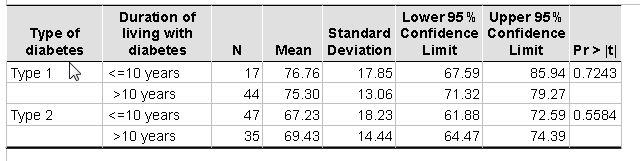
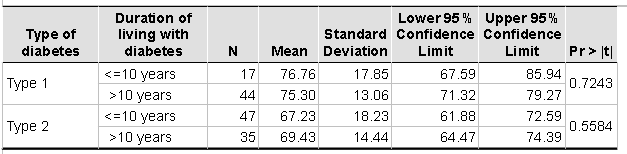
So I want the Type of Diabetes cell and p-value cell merged and vertically centered, so there is no blank cell under it, basically to look like this:
How do I do this? I did add the Vjust=middle option for the two variables... But I guess I have to add in another line of code somewhere to merge the cells? Can someone please help me?
I did try looking at the solution outlined here, but I don't have missing data (Someone suggested doing "If not missing(pvalue) then _pvalue=pvalue; else pvalue=_pvalue; " I did try it with the retain function, but it didn't do anything since I didn't have missing data., so it pretty much copying the variable
Thanks!!
Edit: I also tried adding the SPANROW option on the Proc report statment and order=data option on the define statement as outlined here. And it didn't work either. I am on SAS 9.4 and the option wasn't blue so unsure if it was removed between 9.2 to 9.4.
Accepted Solutions


- Mark as New
- Bookmark
- Subscribe
- Mute
- RSS Feed
- Permalink
- Report Inappropriate Content
Hi:
When I run a slightly modified version of your code in SAS 9.4 M3, I do see the results you want with SPANROWS. Since you really are not grouping, I changed the usages to ORDER and DISPLAY.
Here's the output:
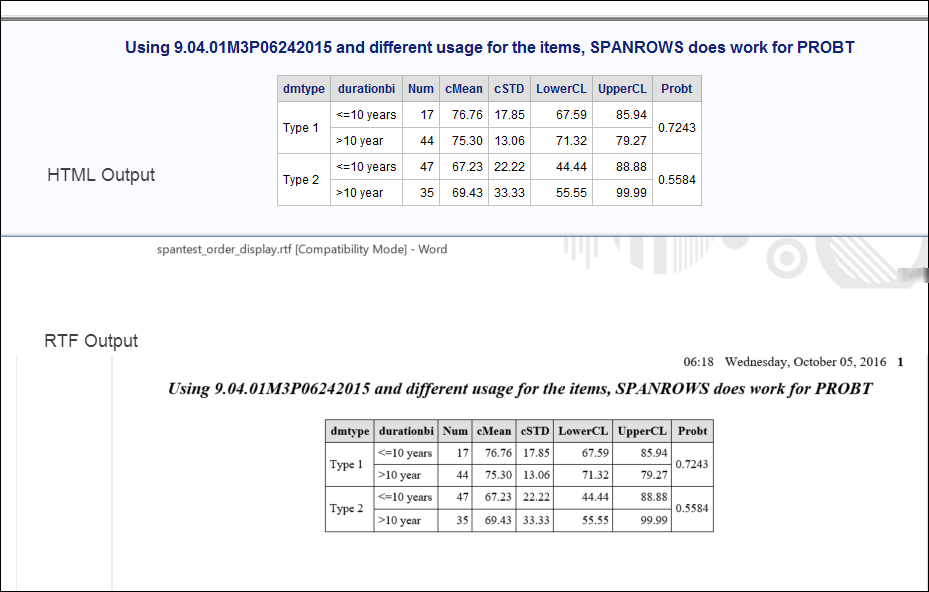
And the code that produced the output (with a DATA step to make some fake data) is below.
cynthia
Here's the code:
data table3way;
  length dmtype durationbi $15;
  infile datalines dlm=',' dsd;
  input dmtype $ ordvar Durationbi $ Num cMean cSTD LowerCL UpperCL Probt;
return;
datalines;
"Type 1",1,"<=10 years",17,76.76,17.85,67.59,85.94,0.7243
"Type 1",2,">10 year",44,75.30,13.06,71.32,79.27,0.7243
"Type 2",1,"<=10 years",47,67.23,22.22,44.44,88.88,0.5584
"Type 2",2,">10 year",35,69.43,33.33,55.55,99.99,0.5584
;
run;

proc sort data=table3way;
  by  dmtype ordvar durationbi;
run;

options orientation=portrait;

ods html(id=ht) file="c:\temp\spantest_order_display.html";
ods rtf file="c:\temp\spantest_order_display.rtf"   ;

title "Using &sysvlong4 and different usage for the items, SPANROWS does work for PROBT";
proc report data=table3way  nowindows split='~' spanrows
	style(report)={font_size=9pt }
	style(header)={just=center font_weight=bold font_size=9pt background=CXE0E0E0}
	style(column)={font_size=9pt protectspecialchars=on};
		column dmtype Durationbi  Num cMean cSTD LowerCL UpperCL probt;
		define dmtype/order style(column)=[vjust=m just=l];
		define Durationbi /display;
		define num/display;
		define cMean/display  format=9.2;
		define cSTD/display format=9.2;
		define LowerCL/display format=9.2;
		define UpperCL/display format=9.2;
		define probt / order style(column)={vjust=m just=l};
	run;


footnote;title;
ods rtf close;
ods html(id=ht) close;- Mark as New
- Bookmark
- Subscribe
- Mute
- RSS Feed
- Permalink
- Report Inappropriate Content
Hi:
When I run a slightly modified version of your code in SAS 9.4 M3, I do see the results you want with SPANROWS. Since you really are not grouping, I changed the usages to ORDER and DISPLAY.
Here's the output:
And the code that produced the output (with a DATA step to make some fake data) is below.
cynthia
Here's the code:
data table3way;
  length dmtype durationbi $15;
  infile datalines dlm=',' dsd;
  input dmtype $ ordvar Durationbi $ Num cMean cSTD LowerCL UpperCL Probt;
return;
datalines;
"Type 1",1,"<=10 years",17,76.76,17.85,67.59,85.94,0.7243
"Type 1",2,">10 year",44,75.30,13.06,71.32,79.27,0.7243
"Type 2",1,"<=10 years",47,67.23,22.22,44.44,88.88,0.5584
"Type 2",2,">10 year",35,69.43,33.33,55.55,99.99,0.5584
;
run;

proc sort data=table3way;
  by  dmtype ordvar durationbi;
run;

options orientation=portrait;

ods html(id=ht) file="c:\temp\spantest_order_display.html";
ods rtf file="c:\temp\spantest_order_display.rtf"   ;

title "Using &sysvlong4 and different usage for the items, SPANROWS does work for PROBT";
proc report data=table3way  nowindows split='~' spanrows
	style(report)={font_size=9pt }
	style(header)={just=center font_weight=bold font_size=9pt background=CXE0E0E0}
	style(column)={font_size=9pt protectspecialchars=on};
		column dmtype Durationbi  Num cMean cSTD LowerCL UpperCL probt;
		define dmtype/order style(column)=[vjust=m just=l];
		define Durationbi /display;
		define num/display;
		define cMean/display  format=9.2;
		define cSTD/display format=9.2;
		define LowerCL/display format=9.2;
		define UpperCL/display format=9.2;
		define probt / order style(column)={vjust=m just=l};
	run;


footnote;title;
ods rtf close;
ods html(id=ht) close;
Catch up on SAS Innovate 2026
Nearly 200 sessions are now available on demand with the SAS Innovate Digital Pass.
Explore Now →Learn how use the CAT functions in SAS to join values from multiple variables into a single value.

Find more tutorials on the SAS Users YouTube channel.
SAS Training: Just a Click Away
Ready to level-up your skills? Choose your own adventure.
-
1 reply
-
10-05-2016 11:54 AM
-
14699 views
-
2 likes
-
2 in conversation
-

