- Home
- /
- Programming
- /
- ODS Reports
- /
- Re: PDF PROC REPORT Line Wrapping and Insert Header Blank Line
- RSS Feed
- Mark Topic as New
- Mark Topic as Read
- Float this Topic for Current User
- Bookmark
- Subscribe
- Mute
- Printer Friendly Page


- Mark as New
- Bookmark
- Subscribe
- Mute
- RSS Feed
- Permalink
- Report Inappropriate Content
Hello,
I'm converting a legacy code to match the layout in PROC REPORT. The industry titles has embeded leading blanks to indicate indention as required. I am able to preserve the leading space by using a style attribute ASIS=ON. However, it does not preserve indention when wrapping around. Here's an example:
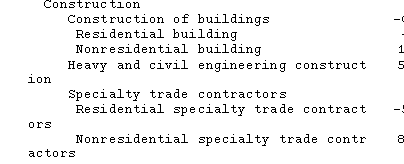
Also, I have another issue is how do I insert a blank line in the COLUMNS statement. I'm providing two images of current and legacy headings.

needs to look like the legacy headings:

Here is my code used for this:
proc report data = outpdf nowd ls = 200 list headskip headline style = monospace nocenter
            style(report) = {fontfamily='Cumberland AMT' font_size = 8pt}
            style(header) = {fontfamily='Cumberland AMT' font_size = 8pt}
            style(column) = {fontfamily='Cumberland AMT' font_size = 8pt};
   columns titlesp ('^S={TEXTDECORATION=underline}Not seasonally adjusted' sea_mov otmccnsa)
                   ('^S={TEXTDECORATION=underline}Seasonally adjusted' otmcc sig_chg signif)
           blank;
   define titlesp / "Industry" display STYLE(COLUMN) = {JUST = L ASIS = ON CELLWIDTH = 2.8in};
   define sea_mov / "Normal/seasonal/movements" format = best5. display STYLE(COLUMN) = {JUST = C CELLWIDTH = 0.75in};
   define otmccnsa / "Estimated/over-the-month/change" format = best5. display STYLE(COLUMN) = {JUST = C CELLWIDTH = 1in};
   define otmcc / "Estimated/over-the-month/change" format = best5. display STYLE(COLUMN) = {JUST = C CELLWIDTH = 1in};
   define sig_chg / "Minimum/significant/change^{super *}" format = best5. display STYLE(COLUMN) = {JUST = C CELLWIDTH = 0.75in};
   define signif / "Pass/test of/significance" display STYLE(COLUMN) = {JUST = C CELLWIDTH = 0.8in};
   define blank / " " computed format=$1.;

   compute blank;
      blank = " ";
   endcomp;
run;
Your assistance is appreciated.
Curtis E. Reid


- Mark as New
- Bookmark
- Subscribe
- Mute
- RSS Feed
- Permalink
- Report Inappropriate Content
"However, it does not preserve indention when wrapping around. "
Make that column has wider length  .  style={cellwidth=10cm}

Or use escapechar:

^_^_^_^_Heavy and engineering ^_^_^_^_ construct


"how do I insert a blank line in the COLUMNS statement"

columns titlesp ('^S={TEXTDECORATION=underline}  Not seasonally adjusted  ^S={}  ^n  ^_^_ '


- Mark as New
- Bookmark
- Subscribe
- Mute
- RSS Feed
- Permalink
- Report Inappropriate Content
Hi Curtis,
you can add a break line by adding a split sign to your sea_mov title for e.g. "/ /Normal/seasonal/movements"
I do get row indentation in the RTF when using your report code, check mine:
data outpdf;
   titlesp='    Construction';
   sea_mov=99.9;
   otmccnsa=99.9;
   otmcc=99.9;
   sig_chg=99.9;
   signif=99.9;
   output;
   titlesp='       Construction of buildings';
   sea_mov=88.8;
   otmccnsa=88.8;
   otmcc=88.8;
   sig_chg=88.8;
   signif=88.8;
   output;
run;

ods rtf file='C:\TEMP\outpdf.rtf';
ods escapechar='^';
proc report data = outpdf nowd ls = 200 list headskip headline style = monospace nocenter
            style(report) = {fontfamily='Cumberland AMT' font_size = 8pt}
            style(header) = {fontfamily='Cumberland AMT' font_size = 8pt}
            style(column) = {fontfamily='Cumberland AMT' font_size = 8pt};
   columns titlesp ('^S={TEXTDECORATION=underline}Not seasonally adjusted' sea_mov otmccnsa)
                   ('^S={TEXTDECORATION=underline}Seasonally adjusted' otmcc sig_chg signif)
           blank;
   define titlesp    / "Industry" display STYLE(COLUMN) = {JUST = L ASIS = ON CELLWIDTH = 2.8in};
   define sea_mov    / "/ /Normal/seasonal/movements" format = best5. display STYLE(COLUMN) = {JUST = C CELLWIDTH = 0.75in};
   define otmccnsa   / "Estimated/over-the-month/change" format = best5. display STYLE(COLUMN) = {JUST = C CELLWIDTH = 1in};
   define otmcc      / "Estimated/over-the-month/change" format = best5. display STYLE(COLUMN) = {JUST = C CELLWIDTH = 1in};
   define sig_chg    / "Minimum/significant/change^{super *}" format = best5. display STYLE(COLUMN) = {JUST = C CELLWIDTH = 0.75in};
   define signif     / "Pass/test of/significance" display STYLE(COLUMN) = {JUST = C CELLWIDTH = 0.8in};
   define blank      / " " computed format=$1.;

   compute blank;
      blank = " ";
   endcomp;
run;
ods rtf close;
Cheers
- Cheers -

Call for content now open!
It's your turn to help shape SAS Innovate 2027. Share your expertise and inspire the SAS community.
Learn how use the CAT functions in SAS to join values from multiple variables into a single value.

Find more tutorials on the SAS Users YouTube channel.
SAS Training: Just a Click Away
Ready to level-up your skills? Choose your own adventure.
-
2 replies
-
09-28-2016 11:59 AM
-
5948 views
-
0 likes
-
3 in conversation
-


