- Home
- /
- Programming
- /
- ODS Reports
- /
- Re: ODS Excel (xlsx) Issue with borders in title (bug?)
- RSS Feed
- Mark Topic as New
- Mark Topic as Read
- Float this Topic for Current User
- Bookmark
- Subscribe
- Mute
- Printer Friendly Page


- Mark as New
- Bookmark
- Subscribe
- Mute
- RSS Feed
- Permalink
- Report Inappropriate Content
Hello,
In ODS Excel the borders of the title are not displayed properly across the entire merged cells:

In ODS Tagset.ExcelXP it works without problems:

Sample Code:
proc template;
	define style title_test;
		parent=styles.HTMLBlue;
		class SystemTitle /
			background=pink
			bordercolor = black
			borderstyle = solid
			borderbottomcolor=aquamarine
			borderbottomwidth=4
		;
	end;
run;

ods tagsets.excelxp(i) file="test_tagset_excelxp.xls"
	style=title_test
options(
		sheet_interval = 'none'
		sheet_name='test'
		sheet_label = ' '
		embedded_titles = 'yes'
		suppress_bylines = 'yes'
		Merge_Titles_Footnotes='yes'
	);

title "Title in ODS Tagset ExcelXP Output";

proc print data=sashelp.cars(obs= 20); run;

ods _all_ close;

ods excel file='test_ods_excel.xlsx'
	style=title_test
	options(
		sheet_interval = 'none'
		sheet_name='test'
		sheet_label = ' '
		embedded_titles = 'yes'
		suppress_bylines = 'yes'
	);
ods escapechar='^';

title1 "Title in ODS Excel Output";

proc print data=sashelp.cars(obs= 20); run;

ods _all_ close;
Why? Is this a known issue? Any solutions?
Many thanks!


- Mark as New
- Bookmark
- Subscribe
- Mute
- RSS Feed
- Permalink
- Report Inappropriate Content
What is your SAS version?
- Mark as New
- Bookmark
- Subscribe
- Mute
- RSS Feed
- Permalink
- Report Inappropriate Content
SAS Enterprise Guide: 7.11 HF5 (7.100.1.2856) (32-Bit)
SAS Server: 9.04.01 / Linux


- Mark as New
- Bookmark
- Subscribe
- Mute
- RSS Feed
- Permalink
- Report Inappropriate Content
cynthia
- Mark as New
- Bookmark
- Subscribe
- Mute
- RSS Feed
- Permalink
- Report Inappropriate Content
Hi:
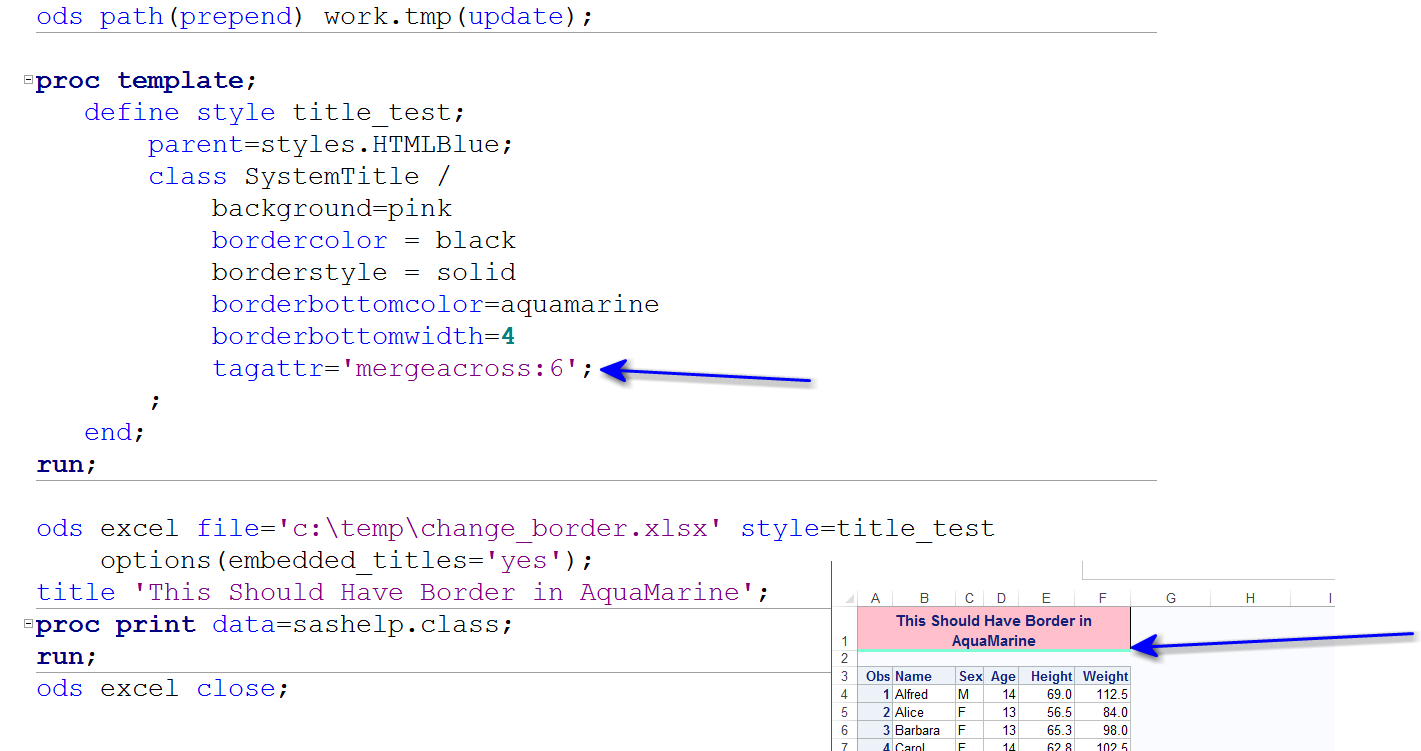
Posting an updated example. From SAS Tech Support, there is a known defect about this behavior. The workaround is shown below, in a STYLE template change.
cynthia

Catch up on SAS Innovate 2026
Nearly 200 sessions are now available on demand with the SAS Innovate Digital Pass.
Explore Now →Learn how use the CAT functions in SAS to join values from multiple variables into a single value.

Find more tutorials on the SAS Users YouTube channel.
SAS Training: Just a Click Away
Ready to level-up your skills? Choose your own adventure.
-
4 replies
-
12-01-2016 08:16 AM
-
3208 views
-
0 likes
-
3 in conversation
-


