- Home
- /
- Programming
- /
- ODS Reports
- /
- Merging ODSText Title in ODS Excel Output with backgroundcolor
- RSS Feed
- Mark Topic as New
- Mark Topic as Read
- Float this Topic for Current User
- Bookmark
- Subscribe
- Mute
- Printer Friendly Page


- Mark as New
- Bookmark
- Subscribe
- Mute
- RSS Feed
- Permalink
- Report Inappropriate Content
Hi,
I am testing ODS Excel to see if we should move our report generation from tagsets.excelxp.
Our reports generally had one Title Line with a Black background and white text.
I have been testing the ODS Excel with proc odstext to generate titles, but I have been unable to make this title merge across the report columns to fully display the text.
Using SAS9.4 1M3
I have included some sample code, does anyone know a method to merge this title across in ODS Excel?
Thank you
dm log 'clear' log;
data test;
input Var1 Var2 Var3 Var4 $;
datalines;
20 25 30 Long line of text
1 8 64 Long line of text
14 32 38 Short text
15 12 12 The longest line of text of all time
;
run;
ods listing close;
ods excel file="&outPath\Test.xlsx"
options(embedded_titles='yes'
Title_Footnote_nobreak='yes'
title_footnote_width='8'
sheet_name='Custom_Sheet'
title_footnote_nobreak='yes'
sheet_interval='none'
);
ods escapechar="^";
proc odstext;
p "This is a test, it is not a real dataset. " / style=[font_weight=bold font_size=15pt color=white backgroundcolor=black nobreakspace=yes];
run;
proc print data=test;
run;
ods excel close;
Accepted Solutions


- Mark as New
- Bookmark
- Subscribe
- Mute
- RSS Feed
- Permalink
- Report Inappropriate Content
Instead of using Proc ODSTEXT, I suggest to use a TITLE statement, this will automatically span the columns of your output. something like
title color=cxffffff bcolor=cx000000 height=15pt bold
  "This is a test, it is not a real dataset. "
;
If you want to add multiple table and have something like a header for each table that spawns the number of columns you have in the table, you could use the tech below using Proc REPORT with the COMPUTE BEFORE _PAGE_
proc report data=sashelp.class;
  column ("Span" name age sex height weight);
  compute before _page_ /
    style=[font_weight=bold font_size=15pt color=white backgroundcolor=black]
  ;
    xTitle = "This is a test, it is not a real dataset. ";
    len = length(xTitle);
    line xTitle $varying1024. len;
  endcomp;
run;

proc report data=sashelp.cars;
  column make model type origin invoice horsepower;
    compute before _page_ /
    style=[font_weight=bold font_size=15pt color=white backgroundcolor=black]
  ;
    xTitle = "This is a test, it is not a real dataset. ";
    len = length(xTitle);
    line xTitle $varying1024. len;
  endcomp;
run;
- Mark as New
- Bookmark
- Subscribe
- Mute
- RSS Feed
- Permalink
- Report Inappropriate Content
Instead of using Proc ODSTEXT, I suggest to use a TITLE statement, this will automatically span the columns of your output. something like
title color=cxffffff bcolor=cx000000 height=15pt bold
  "This is a test, it is not a real dataset. "
;
If you want to add multiple table and have something like a header for each table that spawns the number of columns you have in the table, you could use the tech below using Proc REPORT with the COMPUTE BEFORE _PAGE_
proc report data=sashelp.class;
  column ("Span" name age sex height weight);
  compute before _page_ /
    style=[font_weight=bold font_size=15pt color=white backgroundcolor=black]
  ;
    xTitle = "This is a test, it is not a real dataset. ";
    len = length(xTitle);
    line xTitle $varying1024. len;
  endcomp;
run;

proc report data=sashelp.cars;
  column make model type origin invoice horsepower;
    compute before _page_ /
    style=[font_weight=bold font_size=15pt color=white backgroundcolor=black]
  ;
    xTitle = "This is a test, it is not a real dataset. ";
    len = length(xTitle);
    line xTitle $varying1024. len;
  endcomp;
run;
- Mark as New
- Bookmark
- Subscribe
- Mute
- RSS Feed
- Permalink
- Report Inappropriate Content
Awesome, that's working for me.
Thanks for the help!


- Mark as New
- Bookmark
- Subscribe
- Mute
- RSS Feed
- Permalink
- Report Inappropriate Content
Hi:
The challenge with what you're trying is that PROC ODSTEXT will write your entire string in column A, that's what I expect, at least. Even though you are setting the title_footnote_width suboption, that will only impact what is specified in a TITLE or FOOTNOTE statement. So that setting will NOT even touch the ODSTEXT.
However, using some slightly different test data:
data test;
length var4 $100;
  infile datalines dsd dlm=',';
input Var1 Var2 Var3 Var4 $;
datalines;
14, 32, 38, "Short text"
15, 12, 12, "The longest line of text of all time"
20, 25, 30, "Twas brillig and the slithy toves did gyre and gimble in the wabe."
;
run;
I was able to generate this using PROC REPORT without using ODSTEXT or a TITLE statement:
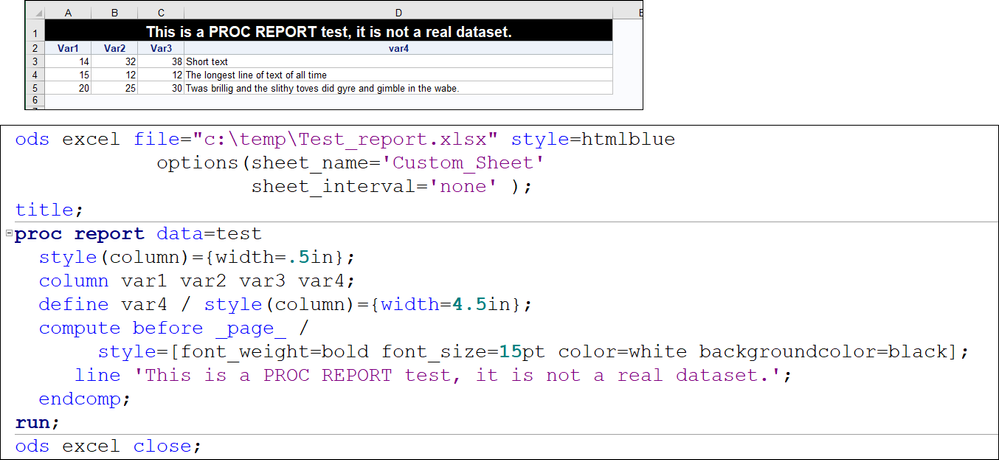
but if you WANT to use PROC PRINT and a TITLE statement instead of ODSTEXT, then what you want can be done using simpler ODS EXCEL syntax, but you need a style template to make the SystemTitle change:
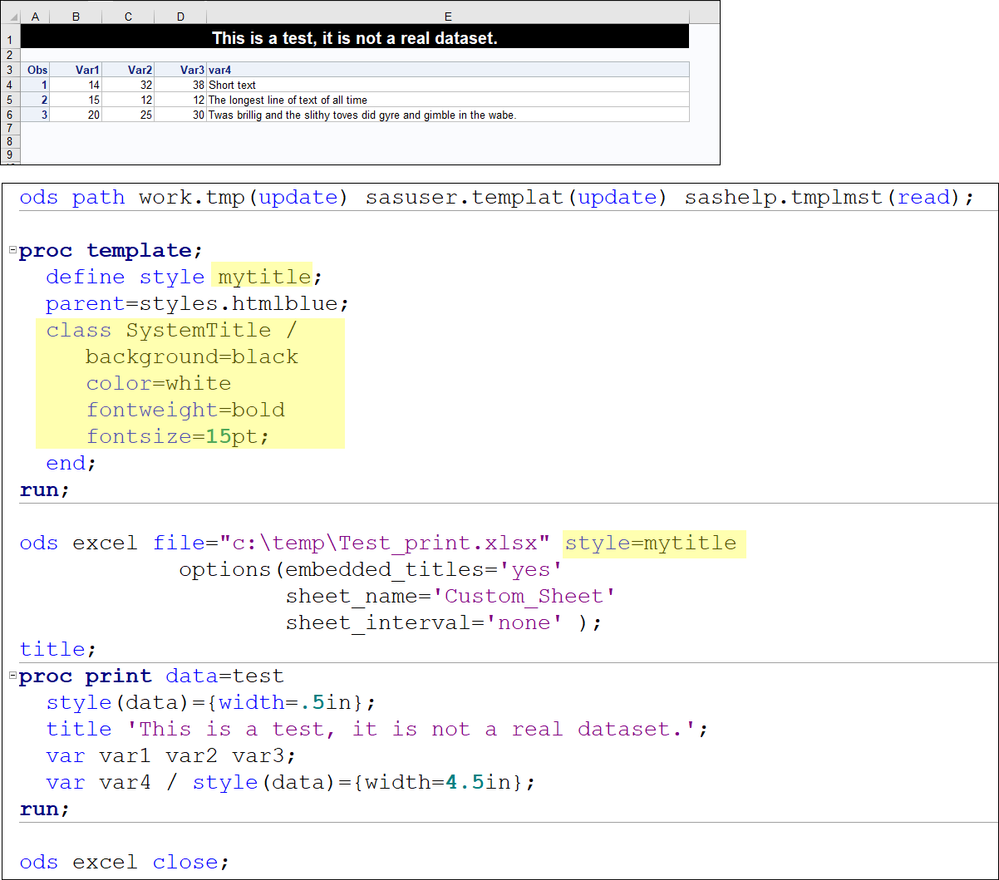
I don't think PROC ODSTEXT is going to work for what you're trying to do in this instance. Perhaps try one of these other alternatives instead.
Cynthia
- Mark as New
- Bookmark
- Subscribe
- Mute
- RSS Feed
- Permalink
- Report Inappropriate Content
Thanks for the help!
I tried to simplify my example, so we actually are using proc reports with compute blocks. I will play around with Title Statements and compute statements, so far those have been working.
- Mark as New
- Bookmark
- Subscribe
- Mute
- RSS Feed
- Permalink
- Report Inappropriate Content
cynthia

Catch up on SAS Innovate 2026
Nearly 200 sessions are now available on demand with the SAS Innovate Digital Pass.
Explore Now →Learn how use the CAT functions in SAS to join values from multiple variables into a single value.

Find more tutorials on the SAS Users YouTube channel.
SAS Training: Just a Click Away
Ready to level-up your skills? Choose your own adventure.
-
5 replies
-
06-01-2018 09:47 AM
-
6047 views
-
2 likes
-
3 in conversation
-


