Hello, everyone!
I am working on a project trying to control the Excel pivot table through SAS. Basically I wrote SAS code to update the data in Excel worksheet, then refresh the linked pivot tables.
DDE is the main method I use. with the X4ML code like PUT '[workbook.protect(FALSE,FALSE,"'"&psw"'")]'; I am able to open Excel file in SAS, protect or unprotect the workbook, update data, etc.
Here are the questions: DDE or X4ML are very old and limited and I have to search for some better methods to
1. Change the data source of the pivot table. For example the original data source is r1c1:r5c4. After updating there are two more rows to be included and the source should be r1c1:r7c4.
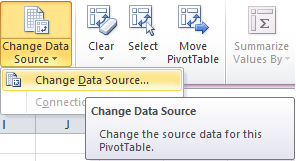
2. Modify protection attributes. When protecting the Exce worksheet, I'd like the user could use pivot table. In other words, check the option in the picture below.
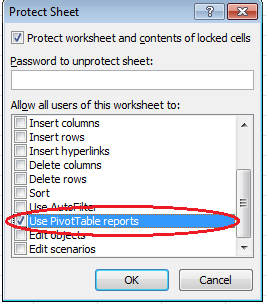
The requirement is, all of these should be done in SAS. I know it is easy to write a piece of macro in Excel but that's not allowed. I believe every function in Excel has a corresponding command that could be used in SAS.
Anyone have any idea about these? Thank you!
Change the datasource to be the full worksheet and select out blanks in your pivot table instead.
Hi:
When you state your believe that "every function in Excel has a corresponding command that could be used in SAS", I am not sure that this is true. I would recommend that you work with Tech Support on your question. In addition, at the beginning of your post, you say that "DDE or X4ML are very old and limited and I have to search for some better methods to 1)... 2)...." Here's an interesting paper that uses VB.NET technology to interact between SAS and Excel (http://support.sas.com/resources/papers/proceedings10/191-2010.pdf).
cynthia
Not saying you should, but if you use xlsx you could manipulate the XML directly. The XLSX is a zip file, if you rename it and then open it there are various folders/XML docs. At a rough guess I think \xl\pivotTables\pivotTable1.xml is probably the one to edit (of course this is assuming the file already has pivot table and it is called pivotTable1). You could read up on the Microsoft open document format if your interested in reading/writing directly though its a bit of a chore.
April 27 – 30 | Gaylord Texan | Grapevine, Texas
Walk in ready to learn. Walk out ready to deliver. This is the data and AI conference you can't afford to miss.
Register now and lock in 2025 pricing—just $495!