- Home
- /
- Programming
- /
- Graphics
- /
- KM plot with a nested plot as if it were an INSET.
- RSS Feed
- Mark Topic as New
- Mark Topic as Read
- Float this Topic for Current User
- Bookmark
- Subscribe
- Mute
- Printer Friendly Page


- Mark as New
- Bookmark
- Subscribe
- Mute
- RSS Feed
- Permalink
- Report Inappropriate Content
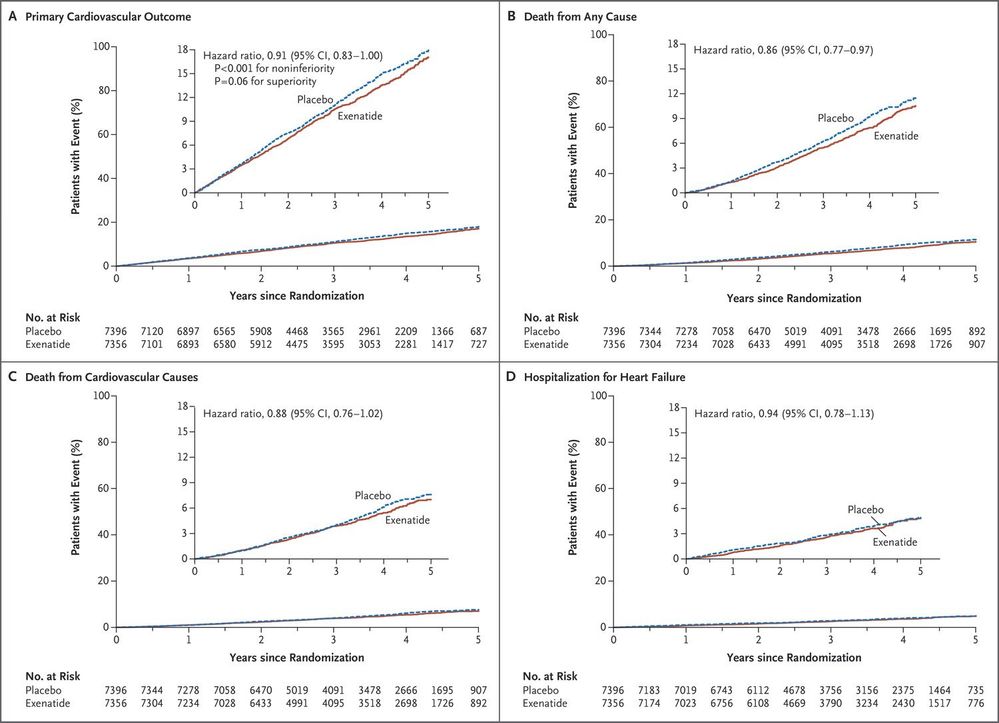
This format can be seen in the New England Journal of Medicine.
Can I make this with ODS graphics, GTL?
Accepted Solutions


- Mark as New
- Bookmark
- Subscribe
- Mute
- RSS Feed
- Permalink
- Report Inappropriate Content
I actually demonstrate this annotation technique in the following paper, on pages 8-10:
Now You Can Annotate Your GTL Graphs! - PharmaSUG
Hope this helps!
Dan


- Mark as New
- Bookmark
- Subscribe
- Mute
- RSS Feed
- Permalink
- Report Inappropriate Content
I would imagine you could make a graph, store it as an image, then make the outer graph and bring in the image for the inner graph through SG Annotation. That's all that pops into my mind this close to bed time.
- Mark as New
- Bookmark
- Subscribe
- Mute
- RSS Feed
- Permalink
- Report Inappropriate Content
I actually demonstrate this annotation technique in the following paper, on pages 8-10:
Now You Can Annotate Your GTL Graphs! - PharmaSUG
Hope this helps!
Dan
- Mark as New
- Bookmark
- Subscribe
- Mute
- RSS Feed
- Permalink
- Report Inappropriate Content
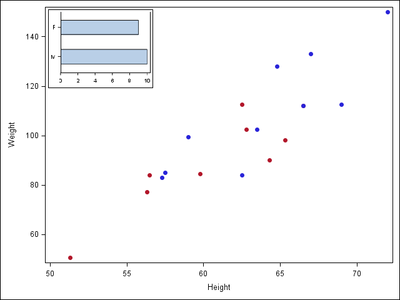
Great example, Dan! Here is a simple example I worked up that illustrates the principles involved.
Very cool technique! I have never done this before. (edited since part of my code was with the text).
ods graphics on / reset=all imagename="Inset" height=120px width=160px border=off;

proc sgplot data=sashelp.class;
   hbar sex / barwidth=0.5;
   yaxis display=(nolabel);
   xaxis display=(nolabel);
run;

data anno;
   retain function "image" width 30 x1 1 y1 99 anchor "topleft"
          drawspace "wallpercent" image 'Inset.png';
run;

ods graphics on / reset=all imagename="Embedding";
proc sgplot data=sashelp.class sganno=anno noautolegend;
   styleattrs datacolors=(blue red) datasymbols=(circlefilled);
   scatter y=weight x=height / group=sex;
run;

- Mark as New
- Bookmark
- Subscribe
- Mute
- RSS Feed
- Permalink
- Report Inappropriate Content
This would work better if you provide a size for the inset image, and make sure it is placed in the right location.
ods html close;
ods listing gpath='c:\';
ods graphics / reset width=2in height=1.5in imagename='Inset';
proc sgplot data=sashelp.class;
hbar sex / barwidth=0.5;
yaxis display=(nolabel);
xaxis display=(nolabel);
run;
data anno;
retain function "image" width 30 x1 1 y1 99 anchor "topleft"
drawspace "wallpercent" image 'c:\Inset.png';
run;
ods graphics on / reset=all imagename="Embedding";
proc sgplot data=sashelp.class sganno=anno noautolegend;
styleattrs datacolors=(blue red) datasymbols=(circlefilled);
scatter y=weight x=height / group=sex;
run;
- Mark as New
- Bookmark
- Subscribe
- Mute
- RSS Feed
- Permalink
- Report Inappropriate Content
Sorry. Copy and paste error on my part. Here it is including my initial statement, which does specify a size.
ods graphics on / reset=all imagename="Inset" height=120px width=160px border=off;

proc sgplot data=sashelp.class;
   hbar sex / barwidth=0.5;
   yaxis display=(nolabel);
   xaxis display=(nolabel);
run;

data anno;
   retain function "image" width 30 x1 1 y1 99 anchor "topleft"
          drawspace "wallpercent" image 'Inset.png';
run;

ods graphics on / reset=all imagename="Embedding";
proc sgplot data=sashelp.class sganno=anno noautolegend;
   styleattrs datacolors=(blue red) datasymbols=(circlefilled);
   scatter y=weight x=height / group=sex;
run;- Mark as New
- Bookmark
- Subscribe
- Mute
- RSS Feed
- Permalink
- Report Inappropriate Content
@WarrenKuhfeld wrote:
Great example, Dan! Here is a simple example I worked up that illustrates the principles involved.
Very cool technique! I have never done this before. (edited since part of my code was with the text).
ods graphics on / reset=all imagename="Inset" height=120px width=160px border=off;

proc sgplot data=sashelp.class;
   hbar sex / barwidth=0.5;
   yaxis display=(nolabel);
   xaxis display=(nolabel);
run;

data anno;
   retain function "image" width 30 x1 1 y1 99 anchor "topleft"
          drawspace "wallpercent" image 'Inset.png';
run;

ods graphics on / reset=all imagename="Embedding";
proc sgplot data=sashelp.class sganno=anno noautolegend;
   styleattrs datacolors=(blue red) datasymbols=(circlefilled);
   scatter y=weight x=height / group=sex;
run;
Hi Warren,
Thanks for the helpful example. I think this technique is going to be very useful to me.
- Mark as New
- Bookmark
- Subscribe
- Mute
- RSS Feed
- Permalink
- Report Inappropriate Content
@DanH_sas wrote:
I actually demonstrate this annotation technique in the following paper, on pages 8-10:
Now You Can Annotate Your GTL Graphs! - PharmaSUG
Hope this helps!
Dan
Thanks so much Dan, I figured it would be annotate but I would never have known the proper options/statements without seeing your example.

Call for content now open!
It's your turn to help shape SAS Innovate 2027. Share your expertise and inspire the SAS community.
Learn how use the CAT functions in SAS to join values from multiple variables into a single value.

Find more tutorials on the SAS Users YouTube channel.
SAS Training: Just a Click Away
Ready to level-up your skills? Choose your own adventure.
-
7 replies
-
09-14-2017 05:23 PM
-
6200 views
-
2 likes
-
4 in conversation
-

