- Home
- /
- Programming
- /
- Graphics
- /
- Re: Happy Valentines Day: A Dozen Polar Roses
- RSS Feed
- Mark Topic as New
- Mark Topic as Read
- Float this Topic for Current User
- Bookmark
- Subscribe
- Mute
- Printer Friendly Page


- Mark as New
- Bookmark
- Subscribe
- Mute
- RSS Feed
- Permalink
- Report Inappropriate Content
I was inspired by the blog post, http://blogs.sas.com/content/iml/2015/12/16/polar-rose.html to make a beautiful Valentine with SAS. I was thinking as well you could also make a data set with people's names and use by group processing to make personalized Valentine's but for now you can see below the basic idea. I had fun make these. The roses are random, so each time you run the macro you get slight differences in the selection of roses.
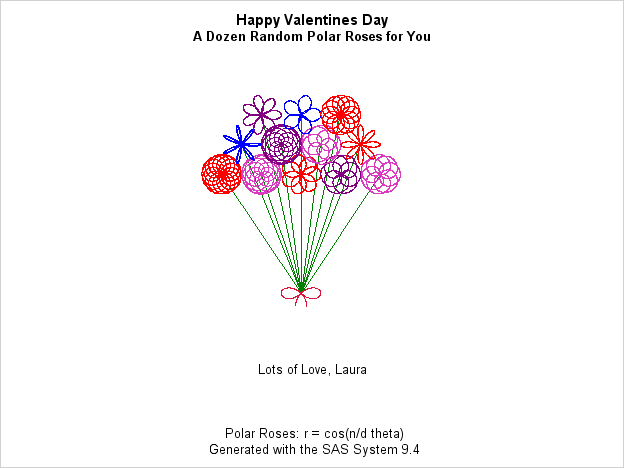
/* rose picture*/
ods graphics/reset=all;
ods graphics/ imagefmt=png;
options device=png;

options nodate nonumber;

*ods graphics/ height=6.5in noborder;
ods pdf gtitle gfootnote
	file="n:\rose_card.pdf"
	 startpage=no ;
title;
ODS USEGOPT ;
%macro makecard(for=Todd,from=Mom);

	data Roses;
		/* the array below has a list of multipliers that make
		pretty roses, it is temporary, so will not be saved
		with the data*/
		array klist{11} _temporary_ (4, 5, 6, 1.5, 2.5, 1.333333, 2.33333, .75, 1.25, 1.2, .8333333);

		do flower=1 to 12;
			n = ceil( 11*rand("Uniform") );

			/*pick a random number
			between 1 and 11*/
			k=klist{n}; /*assign k to be the nth multiplier*/

			/* draw the rose r=cos(k * theta) */
			do theta = 0 to 12*constant("pi") by 0.1;
				r = cos(k * theta);      /* generalized rose */
				x = r*cos(theta);        /* convert to Euclidean coords */
				y = r*sin(theta);

				/*move the rose to the right spot*/
				if flower <= 5 then
					do;
						cx=2*flower+1;
						cy=9;
					end;
				else if 6<= flower<=9 then
					do;
						cx=(2*flower-8);
						cy=10.5;
					end;
				else if 10<= flower<=12 then
					do;
						cx=(2*flower-15);
						cy=12;
					end;

				x=x+cx;
				y=y+cy;
				group=flower;
				output;

				/*make the stem*/
				group=-flower;
				x=cx;
				y=cy;
				output;
				x=7;
				y=3;
				output;
			end;
		end;

		/*bow*/
		do theta = constant("pi")*7.5/12 to constant("pi")*28.5/12 by 0.01;
			r = cos(2 * (theta));       /* rose */
			x = r*cos(theta);          /* convert to Euclidean coords */
			y = r*sin(theta);
			group=100;

			if y<abs(x) then
				do;
					x=x+7;
					y=y+3;
					output;
				end;
		end;
	run;

	proc sort data=roses;
		by group;
		title1 "Happy Valentines Day &for" ;
		title2 "A Dozen Random Polar Roses for You" ;

	proc sgplot data=Roses aspect=1 noautolegend
			noborder nowall;
		styleattrs datacontrastcolors=
			(
			green green green green
			green green green green
			green green green green
			red  bippk red purple bippk
			blue purple  bippk red purple  blue red
			crimson
				) datalinepatterns=(1);
		series x=x y=y /group=group;
		xaxis min=0 max=15 display=none;
		yaxis min=0 max=15 display=none;
		footnote "Lots of Love, &from";
		footnote2 " ";
		footnote3 " ";
		footnote4 " ";
		footnote5 " Polar Roses: r = cos(k*theta)";
		footnote6 " Generated with the SAS System 9.4";
		footnote7 "initial idea: http://blogs.sas.com/content/iml/2015/12/16/polar-rose.html";
	run;
	title;
	footnote;

%mend;

    %makecard(for=Todd ,from=Laura);

ods pdf close;


- Mark as New
- Bookmark
- Subscribe
- Mute
- RSS Feed
- Permalink
- Report Inappropriate Content
This post *totally* makes my day, @LauraRK! Love what @Rick_SAS did for Valentine's Day 2015: https://communities.sas.com/t5/SAS-Analytics-U/Give-A-Geeky-Valentine/m-p/164135/highlight/true#M806
- Mark as New
- Bookmark
- Subscribe
- Mute
- RSS Feed
- Permalink
- Report Inappropriate Content
Happy Valentines Day, just bumping this up, as it is that time of year again.
- Mark as New
- Bookmark
- Subscribe
- Mute
- RSS Feed
- Permalink
- Report Inappropriate Content
Hi, I added an update
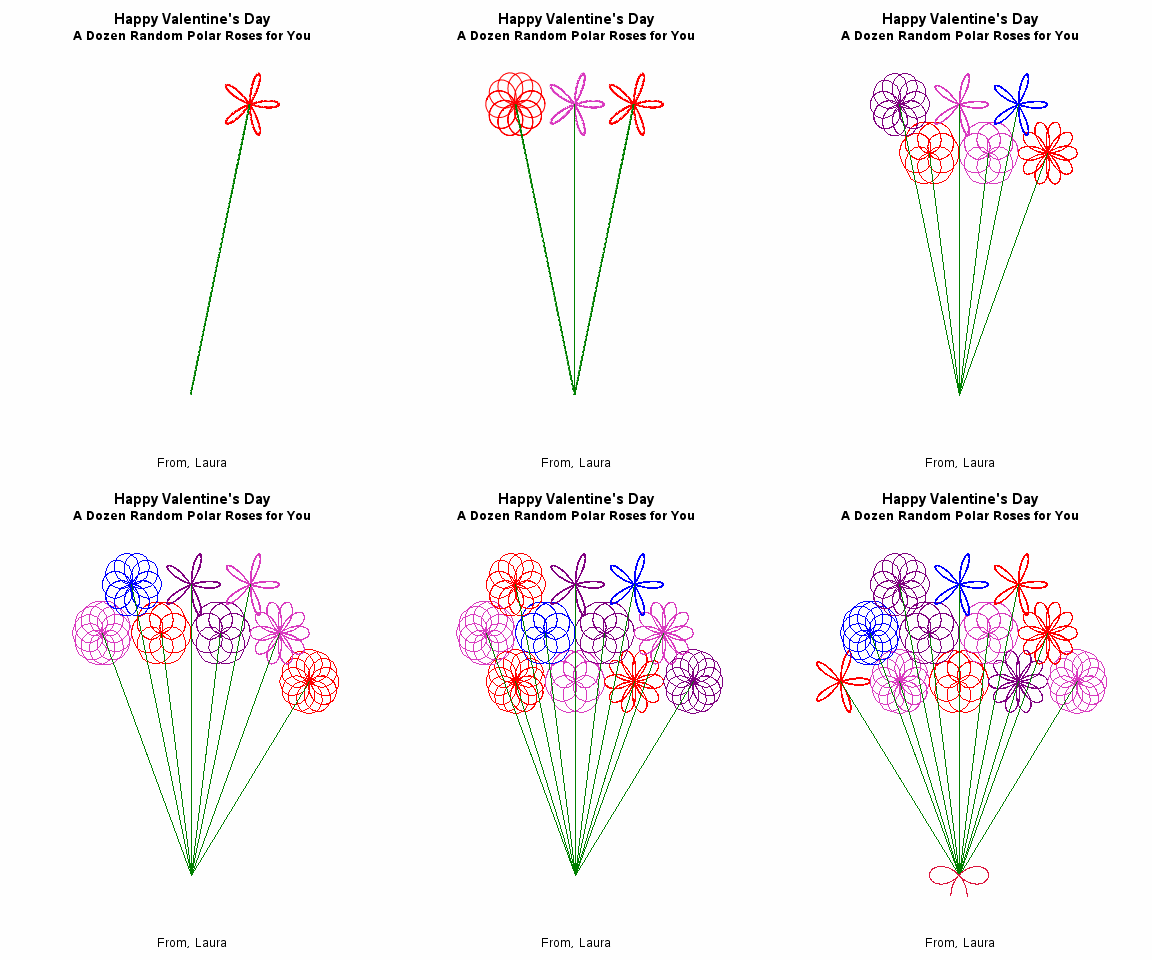
/* rose picture with animation*/
%let for=You;
%let from=Laura;
title;
footnote;
%let outpath=W:\valentines;

ods graphics / imagefmt=GIF width=4in height=5in;     /* each image is 4in x 5in GIF */
options papersize=('4 in', '5 in')                    /* set size for images */
        nodate nonumber                               /* do not show date, time, or frame number */
        animduration=0.5 animloop=yes noanimoverlay   /* animation details */
        printerpath=gif animation=start;              /* start recording images to GIF */
ods printer file="&outpath\Anim.gif";  /* images saved into animated GIF */

%macro makedata;
	data Roses;
		/* the array below has a list of multipliers that make
			pretty roses, it is temporary, so will not be saved
			with the data*/
		array klist{11} _temporary_ (4, 5, 6, 1.5, 2.5, 1.333333, 2.33333, .75, 1.25, 1.2, .8333333);

		do flower=1 to 12;
			n = ceil( 11*rand("Uniform") );
			/*pick a random number
					between 1 and 11*/
			k=klist{n}; /*assign k to be the nth multiplier*/

			/* draw the rose r=cos(k * theta) */
			do theta = 0 to 12*constant("pi") by 0.1;
				r = cos(k * theta);      /* generalized rose */
				x = r*cos(theta);        /* convert to Euclidean coords */
				y = r*sin(theta);

				/*move the rose to the right spot*/
				if flower <= 5 then
					do;
						cx=2*flower+1;
						cy=9;
					end;
				else if 6<= flower<=9 then
					do;
						cx=(2*flower-8);
						cy=10.5;
					end;
				else if 10<= flower<=12 then
					do;
						cx=(2*flower-15);
						cy=12;
					end;

				x=x+cx;
				y=y+cy;
				group=flower;
				do i=0 to flower; output; end;

				/*make the stem*/
				group=flower+.5;
				x=cx;
				y=cy;
				do i=0 to flower; output; end;
				x=7;
				y=3;
				do i= 0 to flower; output; end;
			end;
		end;

		/*bow*/
		do theta = constant("pi")*7.5/12 to constant("pi")*28.5/12 by 0.01;
			r = cos(2 *(theta));       /* rose */
			x = r*cos(theta);          /* convert to Euclidean coords */
			y = r*sin(theta);
			group=100;
			i=0;
			if y<abs(x) then
				do;
					x=x+7;
					y=y+3;
					output;
				end;
		end;
	run;

%mend;

%makedata;
data roses2 ;
  set roses;
  i=13-i;
run;

proc sort data=roses2;
	by i group;
run;


options nobyline;
proc sgplot data=Roses2  aspect=1 noautolegend
	noborder nowall noopaque;;
	by i;
	styleattrs datacontrastcolors=
		(
		red green
		 bippk green red green purple green bippk green
		blue green purple green  bippk green red green purple green
blue green red green
		crimson
			) datalinepatterns=(1);
	series x=x y=y /group=group;
	xaxis min=1 max=13 display=none;
	yaxis min=2 max=13 display=none;
	title1 "Happy Valentine's Day";
	title2 "A Dozen Random Polar Roses for &for";
	footnote1 "From, &from";
/*	footnote2 " Polar Roses: r = cos(k*theta)";
	footnote3 " Generated with the SAS System 9.4";
	footnote4 "see: http://blogs.sas.com/content/iml/2015/12/16/polar-rose.html";
*/
	run;
                                /* restore screen output */

options printerpath=gif animation=stop;               /* stop recording images */
ods printer close;

title;
footnote;
Catch up on SAS Innovate 2026
Nearly 200 sessions are now available on demand with the SAS Innovate Digital Pass.
Explore Now →Learn how use the CAT functions in SAS to join values from multiple variables into a single value.

Find more tutorials on the SAS Users YouTube channel.
SAS Training: Just a Click Away
Ready to level-up your skills? Choose your own adventure.
-
3 replies
-
02-15-2016 03:02 PM
-
5473 views
-
14 likes
-
2 in conversation
-


