- Home
- /
- Programming
- /
- Graphics
- /
- Change Heat Map Color Scale
- RSS Feed
- Mark Topic as New
- Mark Topic as Read
- Float this Topic for Current User
- Bookmark
- Subscribe
- Mute
- Printer Friendly Page


- Mark as New
- Bookmark
- Subscribe
- Mute
- RSS Feed
- Permalink
- Report Inappropriate Content
I'm using SAS 14.1. I'm making a heat map of Spearman correlations. The x-axis and the y-axis both list the same 14 metals and the color indicates a metal's correlation with another metal. The figure looks good, but I want to change the color scale. Right now, the correlations range from about -.6 to 1 (1 meaning that the metal is perfectly correlated with itself) and the colors range from dark blue to white to dark red. Since 0 isn't right in the middle of this range, a correlation of 0 is indicated by a pale blue, but I would like white to represent 0 since that makes the most intuitive sense. Does anyone know how I can "slide" the color scale down this way so that 0 is white? My code is below and I attached the resulting heat map.
proc template;
define statgraph heatmapparm;
begingraph;
layout overlay;
heatmapparm x=metal_1 y=metal_2 colorresponse=spearman_corr /
name="heatmapparm";
continuouslegend "heatmapparm" / location=outside valign=bottom;
endlayout;
endgraph;
end;
run;
proc sgrender data=final template=heatmapparm;
run;
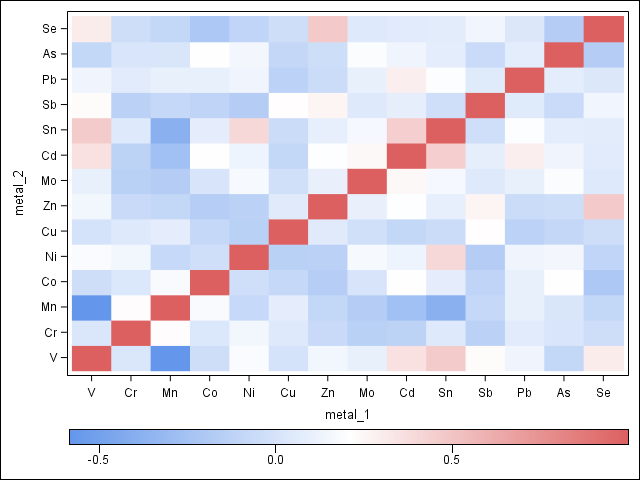
Accepted Solutions


- Mark as New
- Bookmark
- Subscribe
- Mute
- RSS Feed
- Permalink
- Report Inappropriate Content
You also need to use the RANGEATTRVAR statement to define the variable that is the response. The following is untested:
rangeattrmap name='ThreeColor';
   range -1-1 / rangecolormodel=ThreeColorRamp;
endrangeattrmap;
rangeattrvar attrvar=rangevar var=spearman_corr attrmap=ThreeColor;
...

heatmapparm colorresponse=rangevar ...;
- Mark as New
- Bookmark
- Subscribe
- Mute
- RSS Feed
- Permalink
- Report Inappropriate Content
the easiest approach is the user the RANGE option to set the range of the colorramp to [-1, 1]. Look at the doc for the RANGEATTRMAP statement. the syntax will look something like this:
rangeattrmap name='ThreeColor';
    range -1 - 1 / rangecolormodel=ThreeColorRamp;
endrangeattrmap;- Mark as New
- Bookmark
- Subscribe
- Mute
- RSS Feed
- Permalink
- Report Inappropriate Content
Thank you, Rick. I altered my code, ran it and didn't see an error in the log, but the result looked the same. Did I get something about the syntax wrong?
proc template;
define statgraph heatmapparm;
begingraph;
rangeattrmap name="ThreeColor";
range -1-1 / rangecolormodel=ThreeColorRamp;
endrangeattrmap;
layout overlay;
heatmapparm x=metal_1 y=metal_2 colorresponse=spearman_corr /
name="heatmapparm" /*xbinaxis=false ybinaxis=false*/;
continuouslegend "heatmapparm" / location=outside valign=bottom;
endlayout;
endgraph;
end;
run;
- Mark as New
- Bookmark
- Subscribe
- Mute
- RSS Feed
- Permalink
- Report Inappropriate Content
You also need to use the RANGEATTRVAR statement to define the variable that is the response. The following is untested:
rangeattrmap name='ThreeColor';
   range -1-1 / rangecolormodel=ThreeColorRamp;
endrangeattrmap;
rangeattrvar attrvar=rangevar var=spearman_corr attrmap=ThreeColor;
...

heatmapparm colorresponse=rangevar ...;
- Mark as New
- Bookmark
- Subscribe
- Mute
- RSS Feed
- Permalink
- Report Inappropriate Content
That worked perfectly! Thank you so much, Rick!

Call for content now open!
It's your turn to help shape SAS Innovate 2027. Share your expertise and inspire the SAS community.
Learn how use the CAT functions in SAS to join values from multiple variables into a single value.

Find more tutorials on the SAS Users YouTube channel.
SAS Training: Just a Click Away
Ready to level-up your skills? Choose your own adventure.
-
4 replies
-
04-28-2016 09:32 AM
-
6287 views
-
0 likes
-
2 in conversation
-


