BookmarkSubscribeRSS Feed
nicopalacios
Calcite | Level 5

Hello everyone!

My question is simply, how do to change the language of SAS english to spanish?

Thanks!

1 REPLY 1
ChrisHemedinger
Community Manager

I can answer this for SAS Enterprise Guide.

First, you must have the Spanish language resources installed for SAS Enterprise Guide.  In the SAS Enterprise Guide installation folder, you would see a folder for "./es" installed with the application files. 

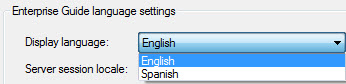
With this in place, you will see a "Spanish" option under the list of languages in Tools->Options, General tab.  Select Spanish and restart SAS Enterprise Guide to see the UI in Spanish.

es.jpg

If you don't have the Spanish resources installed but you want the UI to adhere to Spanish conventions for date values and other cultural differences, see the advice in this blog post.

Chris

SAS For Dummies 3rd Edition! Check out the new edition, covering SAS 9.4, SAS Viya, and all of the modern ways to use SAS!

sas-innovate-2026-white.png


April 27 – 30 | Gaylord Texan | Grapevine, Texas

Registration is open

Walk in ready to learn. Walk out ready to deliver. This is the data and AI conference you can't afford to miss.
Register now and lock in 2025 pricing—just $495!

Register now

How to Concatenate Values

Learn how use the CAT functions in SAS to join values from multiple variables into a single value.

Find more tutorials on the SAS Users YouTube channel.

SAS Training: Just a Click Away

 Ready to level-up your skills? Choose your own adventure.

Browse our catalog!

Discussion stats
  • 1 reply
  • 4435 views
  • 0 likes
  • 2 in conversation